
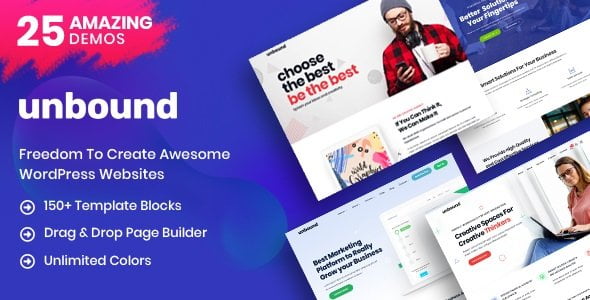

Unbound – Business Agency Multipurpose Theme for Flexible WordPress Websites
Unbound – Business Agency Multipurpose Theme is created for WordPress users who need a flexible, professional, and conversion-ready website for business services, creative agencies, consulting firms, startups, portfolios, landing pages, and online stores. Instead of limiting your website to one narrow niche, Unbound gives you a broader design foundation that can be shaped around different business goals, client industries, and content styles.
For many companies, a website has to do several jobs at once. It must introduce the brand, explain services, show credibility, collect leads, display work, publish content, and sometimes sell products. Unbound is suitable for that kind of multi-purpose business website where presentation, flexibility, and growth potential matter equally.
Unbound at a Glance: Theme Intent, Category, and Audience Fit
Unbound belongs to the WordPress Theme category and is designed for business agency and multipurpose website use. The name “Unbound” suggests flexibility, freedom, and scalability, which fits well for users who do not want a rigid one-industry layout.
The main purpose of this theme is to help users create modern business websites without building every section from scratch. It can support agency homepages, service pages, portfolio showcases, startup landing pages, company profiles, blog layouts, product pages, and contact-focused lead generation pages.
Industry Direction
Unbound fits multiple industries, including digital agencies, business consultants, creative studios, marketing companies, IT firms, finance consultants, SaaS startups, personal brands, freelancers, and service-based local businesses. It is also practical for developers and agencies who need one adaptable theme for different client projects.
Who Can Use It Best?
WordPress users can use Unbound to create a polished business website. Developers can customize it for clients. Freelancers can build personal service pages and portfolios. Agencies can use it for corporate websites, landing pages, and campaign pages. Bloggers can publish business content, while WooCommerce store owners can create a professional shop or digital product website with a business-focused appearance.
Building a Business Website That Does More Than Look Professional
A business website should not only look modern. It should make the visitor understand what the company does, who it helps, and what action to take next. Unbound can be used to create a website structure where service explanations, brand messaging, contact forms, portfolio sections, and call-to-action areas work together.
For example, a consulting company can use the homepage to explain business advisory services, client challenges, process steps, and consultation options. A creative agency can highlight branding, design, website development, social media, and campaign work. A startup can present its product idea, value proposition, pricing, and early access form.
This flexibility makes Unbound useful for users who want a professional business website today but may expand into new services, products, or landing pages later.
Agency Presentation for Services, Projects, and Client Confidence
Agencies need websites that communicate both creativity and reliability. A visitor may be interested in your service, but before contacting you, they want to see your work quality, process, experience, and proof. Unbound can help organize those elements into clear sections that support trust and conversion.
A digital agency can use it to display SEO services, web design, branding, paid ads, content marketing, and social media management. A design studio can show portfolio items, case studies, visual concepts, and client testimonials. A development agency can present custom WordPress development, app development, maintenance plans, and technical support.
Agency Website Sections That Work Well
- Service overview with short and clear explanations
- Portfolio or case study area for completed projects
- Client testimonial section for social proof
- Team introduction for a more human brand feel
- Process timeline showing how projects are handled
- Contact form for quote requests and project enquiries
Multipurpose Layout Freedom for Different Business Models
One of the biggest advantages of a multipurpose business theme is adaptability. Not every website owner wants to rebuild their site when the business changes. Unbound can support different website types, making it useful for users who need room to grow.
A freelancer may start with a simple portfolio and later add service packages. A startup may begin with a landing page and later add pricing, blog, documentation, and product pages. An agency may create different landing pages for separate campaigns. A WooCommerce seller may start with a few digital products and later expand into a full online store.
Website Concepts You Can Create
- Corporate business website
- Creative agency portfolio
- Startup landing page
- Consultant personal brand website
- Digital marketing service website
- IT solutions and software company website
- Business blog or knowledge hub
- WooCommerce shop for services or digital products
Service Pages That Convert Visitors into Enquiries
For service-based businesses, clear service pages are essential. A visitor should not have to guess what you offer or how your service solves their problem. Unbound can be used to create dedicated pages for each service, supported by short explanations, icons, examples, pricing hints, FAQs, and contact buttons.
For better conversion, each service page should focus on the customer’s problem before listing technical details. For example, instead of only saying “website development,” explain that you help businesses build fast, mobile-friendly, SEO-ready websites that generate enquiries. Instead of only saying “business consulting,” explain how you help improve planning, operations, sales, or digital strategy.
Useful Service Page Elements
- A clear headline that explains the result
- Short description of the customer problem
- Simple explanation of the service process
- Examples of suitable clients or industries
- Trust signals such as testimonials or project numbers
- Strong call-to-action for enquiry, quote, or consultation
Portfolio Storytelling for Freelancers and Creative Teams
A portfolio should show more than images. It should tell visitors what was done, why it mattered, and what result was achieved. Unbound can be used to create portfolio pages that present projects in a clean, professional, and business-friendly way.
Freelancers can use portfolio sections to showcase website designs, branding work, social media creatives, UI designs, content projects, photography, or development work. Agencies can use case studies to explain project goals, challenges, solutions, and outcomes. This adds more value than a simple gallery and helps visitors understand your working style.
For SEO, portfolio pages can also include relevant keywords naturally, such as business website design, branding project, WordPress development, digital campaign, landing page design, or eCommerce website setup.
Startup and Landing Page Use for Fast Product Launches
Unbound can also work well for startups that need a landing page before building a full website. A startup landing page usually needs a strong headline, product explanation, audience problem, feature highlights, screenshots, pricing or waitlist form, and trust-building content.
For example, a SaaS startup can use Unbound to present product benefits, demo request buttons, and pricing sections. A mobile app project can show app screenshots, download buttons, and user benefits. A local business launching a new service can create a campaign page with a form and contact details.
This makes the theme useful for quick launches, marketing campaigns, product validation, and lead collection.
Unbound Compared with Niche-Specific WordPress Themes
A niche-specific theme is useful when your website belongs to one clear industry, such as real estate, education, medical, or restaurant. But when you need flexibility across multiple business types, a multipurpose business agency theme like Unbound can be more practical.
Compared with a single-niche WordPress theme, Unbound gives more room for different layouts, service models, brand styles, and future website expansion. This is helpful for agencies and developers who build websites for many types of clients. It is also useful for business owners who may add new services, blogs, landing pages, or WooCommerce products later.
However, the best results come when you customize the theme properly. Replace generic demo text with original copy, use your own brand colors, add real service details, and include trust-building content that matches your business.
WooCommerce Possibilities for Products, Services, and Digital Offers
Unbound can be useful for WooCommerce store owners who want their shop to look more like a professional business brand rather than a plain product catalog. It can support selling physical products, digital downloads, service packages, consultation sessions, templates, subscriptions, or online resources.
A freelancer can sell website audit packages. A designer can sell branding templates. A consultant can sell paid sessions. A digital agency can sell fixed-price marketing packages. A blogger can sell guides, PDFs, or digital toolkits. This makes Unbound suitable for business owners who want both content pages and commerce features in one WordPress website.
Commercial Use Ideas
- Digital product store for templates or downloads
- Service package selling with WooCommerce
- Consultation booking-style product pages
- Agency pricing plans with checkout options
- Business resource shop for guides and toolkits
- Small product catalog for a growing brand
Content Marketing Space for Business Growth
A business website becomes more valuable when it includes helpful content. Unbound can support blog sections, guides, updates, case studies, company news, and educational articles. This is useful for SEO because search engines need useful written content to understand your expertise and match your pages with user intent.
A marketing agency can publish articles about SEO, ads, branding, and lead generation. A consultant can write about business planning, productivity, sales, and operations. A developer can publish WordPress tutorials, plugin guides, and website maintenance tips. A WooCommerce store owner can publish buying guides and product education content.
Good content also supports E-E-A-T. When you share practical examples, honest advice, updated information, and clear author expertise, visitors are more likely to trust your business.
Developer-Friendly Value for Client Website Delivery
For developers, freelancers, and agencies, Unbound can be a practical choice because it can be adapted to different projects. Instead of searching for a new theme for every business category, developers can use one flexible business agency theme and customize it according to each client’s branding and goals.
This can be useful for client websites such as consulting firms, IT companies, marketing agencies, creative portfolios, startup launches, corporate profiles, and WooCommerce stores. With proper content planning and design adjustment, Unbound can help reduce setup time while still delivering a professional result.
Getting Unbound from GPLCare
GPLCare.com provides WordPress themes and plugins for users who want affordable access to professional website-building products. Unbound – Business Agency Multipurpose Theme is a strong option for users who need a flexible WordPress theme for business, agency, startup, portfolio, blog, or WooCommerce-based websites.
Before publishing your website, replace demo content with original business information, real service details, custom images, contact information, testimonials, and brand-focused messaging. For better performance and SEO, use optimized hosting, compressed images, clean plugins, proper headings, internal links, and useful content that answers visitor questions clearly.
Frequently Asked Questions About Unbound – Business Agency Multipurpose Theme
What is Unbound – Business Agency Multipurpose Theme used for?
Unbound is used for building WordPress websites for agencies, businesses, consultants, startups, freelancers, portfolios, blogs, landing pages, and WooCommerce stores.
Is Unbound suitable for an agency website?
Yes. Unbound is suitable for agency websites because it can present services, portfolios, case studies, team details, testimonials, and enquiry forms in a professional format.
Can freelancers use Unbound for personal branding?
Yes. Freelancers can use Unbound to create a personal brand website with service pages, portfolio examples, pricing sections, client reviews, and contact options.
Is Unbound better than a niche-specific WordPress theme?
Unbound is better when you need flexibility for different business types. A niche-specific theme may be better for one fixed industry, but Unbound is more useful for agencies, developers, and businesses that need multipurpose layouts.
Can I use WooCommerce with Unbound?
Yes. Unbound can be used with WooCommerce to sell products, digital downloads, service packages, consultation offers, templates, guides, or business resources.
Does Unbound help with SEO?
Unbound can support SEO-friendly website building when combined with original content, proper heading structure, optimized images, internal linking, fast hosting, and helpful service or blog pages.
Who should download Unbound from GPLCare?
Unbound is ideal for WordPress users, developers, freelancers, agencies, bloggers, consultants, startups, and WooCommerce store owners who want a flexible business-focused WordPress theme.



Reviews
Clear filtersThere are no reviews yet.