
-86%
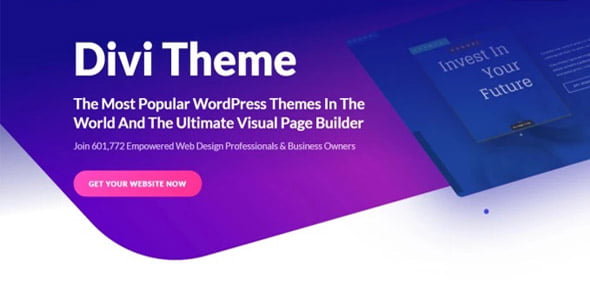
License: GPL | Version: v5.8.1 | Developer: Elegant Themes
This is The Exact Same File as Distributed by The Developer (Click Here)
Divi WordPress Theme v5.8.1
Original price was: $29.00.$3.99Current price is: $3.99.
820
Items sold in last 4 weeks
6
People watching this product now!
Description

Divi at a Glance: Product, Purpose, and Audience
Divi WordPress Theme is a powerful visual website-building theme made for users who want design freedom, flexible layouts, and a smoother WordPress editing experience. It is popular among website owners, freelancers, agencies, bloggers, developers, and WooCommerce store owners because it combines a theme framework with a visual drag-and-drop builder.
Unlike a simple WordPress theme that only changes the look of your website, Divi gives you a complete design system for creating pages, landing pages, blogs, business websites, portfolios, and online stores. For GPLCare.com users, it is a practical choice when building professional websites faster without depending on heavy custom coding for every layout.
Product Analysis
- Product Name: Divi WordPress Theme
- Category: WordPress Theme
- Main Purpose: To build custom WordPress websites visually using flexible design modules, page layouts, and theme customization options.
- Industry Fit: Web design, digital agencies, eCommerce, blogging, online services, education, portfolio websites, and business websites.
- Target Audience: WordPress users, developers, freelancers, agencies, bloggers, WooCommerce store owners, and business owners.
Building WordPress Pages Visually with Divi
The biggest strength of Divi is its visual editing experience. Instead of switching between the WordPress dashboard and preview screen again and again, users can design pages more directly. You can build sections, rows, columns, buttons, forms, image blocks, sliders, pricing areas, service cards, and call-to-action sections from a visual interface.
This is helpful for both beginners and professionals. A beginner can create attractive pages without learning advanced HTML or CSS. A freelancer or agency can use Divi to speed up client projects, test different page layouts, and deliver polished designs in less time.
Where Visual Editing Saves Time
- Creating homepage layouts for business websites
- Designing landing pages for offers or lead generation
- Building service pages for agencies and local businesses
- Updating banners, buttons, and promotional sections
- Customizing blog layouts and content sections
- Designing WooCommerce product-focused pages
A Theme for Agencies That Build Many Types of Websites
Divi is especially useful for web design agencies and freelancers because it can adapt to many industries. One client may need a restaurant website, another may need a coaching website, and another may need a WooCommerce shop. Instead of using a different theme for every project, Divi gives a flexible base that can be shaped for different business goals.
For agencies, this means faster workflow and more consistent design control. You can reuse design patterns, create page sections, adjust branding, and build client websites with a professional structure. This makes Divi a smart option for service providers who regularly create WordPress websites for different clients.
Client Projects Divi Can Support
- Corporate and business websites
- Digital marketing agency websites
- Portfolio websites for designers and photographers
- Coaching, consulting, and personal brand websites
- Educational and course-style websites
- Local service websites for clinics, salons, repair shops, and studios
- Product landing pages and campaign pages
Creating Branded WooCommerce Stores with Divi
Divi can also be useful for WooCommerce store owners who want more control over the look and feel of their online shop. A basic WooCommerce store may list products properly, but it often lacks strong branding and conversion-focused presentation. Divi helps you create a more polished shopping experience with custom sections, product highlights, trust areas, promotional banners, and landing pages.
For example, a fashion store can create stylish collection pages. A digital product seller can design clean product detail pages with feature sections and comparison blocks. A service-based business can sell packages through WooCommerce while using Divi to explain the value of each offer clearly.
WooCommerce Design Ideas for Divi Users
- Featured product sections on the homepage
- Custom landing pages for best-selling products
- Offer banners for discounts, bundles, or seasonal sales
- Trust-building sections with reviews and guarantees
- Product comparison areas for higher-value items
- Category-focused pages for better shopping navigation
Landing Pages That Guide Visitors Toward Action
A strong landing page is not only about design. It needs clear messaging, useful sections, and a smooth path toward conversion. Divi gives users the flexibility to build landing pages for product launches, webinar registrations, service inquiries, app promotions, digital downloads, and special offers.
You can create a page that starts with a strong headline, explains the offer, shows proof, answers objections, and ends with a clear call-to-action. This makes Divi useful for marketers, agencies, consultants, SaaS businesses, online educators, and WooCommerce sellers who want more than a normal page layout.
Conversion Sections You Can Create
- Hero section with headline and button
- Problem and solution explanation
- Service or product breakdown
- Testimonials and social proof
- Pricing tables or package comparison
- FAQ section for buyer confidence
- Contact form, checkout link, or booking button
Blogging and Content Marketing with a Stronger Visual Identity
Divi is not only for business pages and landing pages. Bloggers and content creators can also use it to build a unique content website. A good blog needs readability, clean navigation, attractive featured sections, and a layout that keeps visitors engaged. Divi gives you more freedom to design blog pages, author sections, category pages, and newsletter areas.
This is helpful for affiliate bloggers, tutorial websites, personal brands, review websites, and niche content publishers. Instead of using a plain blog layout, you can create a more branded experience that supports long-term content growth.
Content Website Uses
- Technology blogs and tutorial websites
- Affiliate product review websites
- Personal branding blogs
- Travel, food, fashion, and lifestyle blogs
- Educational resource websites
- Business blogs connected with service pages
Divi Compared with Elementor and Gutenberg
Many users compare Divi with Elementor, Gutenberg, and other WordPress page builders. Elementor is widely known for its flexible page-building workflow, while Gutenberg is the default WordPress block editor. Divi stands out because it works as both a theme and a design builder, giving users a connected website-building experience.
Gutenberg is lightweight and good for content editing, but it may feel limited for users who want advanced visual design control. Elementor is powerful and popular, especially for users who prefer plugin-based page building. Divi is a strong option for users who want a complete theme-based visual design system with reusable layouts and broad customization possibilities.
When Divi May Be the Better Fit
- You want a theme and visual builder working together.
- You create many different page layouts for clients.
- You prefer visual design control over basic block editing.
- You need landing pages, service pages, and WooCommerce layouts.
- You want one flexible theme for multiple website types.
Design Control for Branding, Layout, and User Experience
Every website needs a different design language. A finance website may need a clean and trustworthy style. A creative agency may need bold sections and modern visuals. A WooCommerce fashion shop may need elegant product presentation. Divi allows users to adjust colors, spacing, typography, sections, buttons, and visual hierarchy according to the brand.
This level of control helps create websites that do not look generic. For business owners, it improves brand trust. For developers and agencies, it makes client customization easier. For store owners, it helps products feel more premium and professionally presented.
Branding Areas You Can Improve
- Homepage hero section and first impression
- Service cards and feature blocks
- Button style and call-to-action placement
- Typography and color consistency
- Header, footer, and navigation layout
- Product and portfolio presentation
Practical Workflow for Freelancers and Developers
Freelancers and developers often need to balance speed, quality, and client expectations. Divi helps by providing a flexible framework where layouts can be created visually and adjusted quickly. This is useful during revisions because clients often request changes to spacing, text, images, sections, or page flow.
Instead of rebuilding a page manually, you can make design changes faster. Developers can still add custom CSS or advanced adjustments when required, while non-technical users can manage basic content updates after the website is delivered.
Professional Use Cases
- Creating quick demo layouts for clients
- Building reusable page sections for similar projects
- Designing landing pages for marketing campaigns
- Creating service websites for small businesses
- Customizing WooCommerce pages for better presentation
- Updating content without rebuilding the full website
SEO-Friendly Website Planning with Divi
A WordPress theme alone does not rank a website automatically, but it can support a cleaner website-building process. With Divi, users can create properly structured pages with clear headings, readable sections, internal links, call-to-action blocks, and content areas that match search intent.
For better SEO results, combine Divi with optimized images, fast hosting, a reliable SEO plugin, schema markup where needed, clean URLs, and original content. This is important for business websites, WooCommerce product pages, affiliate blogs, and service landing pages.
SEO Practices to Follow
- Use one clear H1 heading per page.
- Add meaningful H2 and H3 sections for better readability.
- Write original service and product descriptions.
- Compress images before uploading them to WordPress.
- Use internal links between related pages and posts.
- Keep your design clean and mobile-friendly.
- Avoid adding too many heavy effects on important pages.
Mobile Experience for Modern Website Visitors
Most visitors now browse websites from mobile devices, so responsive design is important for every WordPress project. Divi helps users create pages that can be adjusted for desktop, tablet, and mobile views. This is useful for landing pages, WooCommerce stores, blogs, and service websites where visitors may come from search engines, social media, or paid ads.
A mobile-friendly website improves user experience and can help reduce bounce rate. For WooCommerce stores, it also supports smoother browsing and product discovery. For service businesses, it makes it easier for visitors to contact, call, or submit inquiries from their phones.
Who Can Use Divi WordPress Theme?
Divi is suitable for many types of WordPress users because it gives both creative freedom and practical website-building tools. It is a good choice when you want to build a custom-looking website without starting from an empty layout every time.
- WordPress beginners can use Divi to create pages visually with less coding knowledge.
- Freelancers can build client websites faster and handle revisions more easily.
- Agencies can use Divi for multiple industries and project types.
- Bloggers can create branded content websites with better layout control.
- WooCommerce store owners can design attractive product and sales pages.
- Developers can use Divi as a flexible base for custom WordPress projects.
Divi WordPress Theme FAQs
What is Divi WordPress Theme used for?
Divi WordPress Theme is used to build custom WordPress websites visually. It is suitable for business websites, blogs, landing pages, portfolios, agency websites, and WooCommerce stores.
Is Divi good for beginners?
Yes, Divi can be useful for beginners because it offers visual page building and flexible design options. Basic WordPress knowledge is still helpful for setup, content management, and publishing.
Can I use Divi for WooCommerce?
Yes, Divi can be used for WooCommerce websites. Store owners can create product-focused pages, promotional sections, category layouts, and branded shopping experiences.
Is Divi better than Elementor?
Divi and Elementor are both popular website-building options. Divi is a strong choice if you want a theme and builder system together, while Elementor is often preferred by users who want a plugin-based builder workflow. The better option depends on your project style and editing preference.
Is Divi suitable for agency websites?
Yes, Divi is suitable for agency websites. It can be used to create service pages, portfolio sections, case studies, landing pages, pricing areas, and lead generation layouts.
Can bloggers use Divi?
Bloggers can use Divi to create a more branded and visually appealing content website. It is useful for niche blogs, affiliate websites, review sites, and educational content platforms.
Does Divi help with SEO?
Divi can support SEO-friendly website structure when used properly. For best results, use optimized content, fast hosting, compressed images, clean headings, internal links, and a trusted SEO plugin.
Is Divi suitable for client projects?
Yes, Divi is suitable for client projects because it offers flexible layout control, visual editing, and design options that can adapt to different industries and business needs.
Start Designing Flexible WordPress Websites with Divi
Divi WordPress Theme is a strong option for anyone who wants more creative control over WordPress website design. It helps users build business websites, landing pages, blogs, portfolios, and WooCommerce stores with a visual workflow that saves time and supports professional presentation.
For GPLCare.com users, Divi is especially useful if you regularly build websites for clients, manage online stores, create branded content websites, or need a multipurpose WordPress theme that can adapt to different projects. With the right content, optimization, and design planning, Divi can become a powerful foundation for creating attractive and conversion-focused WordPress websites.
GPLCARE Updater Plugin
GPLCARE Updater Plugin Tutorial
New to GPLCARE? Watch this step-by-step tutorial to learn how to install, activate, and use the GPLCARE Updater Plugin directly from your WordPress dashboard.

Easy Installation Guide
Install the GPLCARE Updater Plugin in a few steps.

Update Management
Update themes and plugins directly from WordPress.

Tips & Best Practices
Keep your website updated and secure.
Support and updates
What is included?
Documentation You will find the item’s documentation within the .zip file you download.
Updates Available
You'll always have access to the latest features, fixes, and security updates. Simply re-download the item to get the most up-to-date files. You can find the updates change-log on the item’s description.
What is not included?
Author Support
Author support is not available for items downloaded on GPLCare. If you need support from this item’s author, we recommend you take a look at this item on Original Author. If support is offered, you will receive 6 months of support when you purchase the item there.
Technical support from GPLCare
GPLCare doesn’t offer technical support for individual items. If you need further assistance, please visit our Help center and create Support Tickets here.
Automatic updates All updates require manual installation.
Only logged in customers who have purchased this product may leave a review.
Related products
-92%
Original price was: $39.00.$2.99Current price is: $2.99.
-92%
Original price was: $39.00.$2.99Current price is: $2.99.

-92%
Original price was: $39.00.$2.99Current price is: $2.99.
-92%
Original price was: $39.00.$2.99Current price is: $2.99.
Reviews
Clear filtersThere are no reviews yet.