
-90%
License: GPL | Type: Shopify Theme | Developer: Envato Elements
This is The Exact Same File Distributed by The Developer (Live Preview)
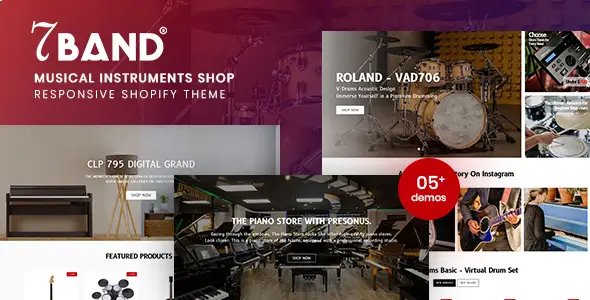
7Band – Musical Instruments Shop Shopify Theme
Original price was: $29.00.$2.99Current price is: $2.99.
560
Items sold in last 4 weeks
2
People watching this product now!
Description

A musical-instrument store needs to present a wide and often technical catalogue without making shopping feel complicated. Guitars, keyboards, studio equipment, percussion, accessories, DJ gear, and audio products can contain many brands, specifications, colors, sizes, and price points. This Shopify theme is designed to give that inventory a clean retail structure while preserving the visual energy expected from a music-focused brand.
Turn A Complex Instrument Catalogue Into A Focused Storefront
The theme includes multiple homepage variations and different header styles, allowing merchants to choose an arrangement that fits their catalogue and campaign strategy. A specialist guitar shop may prioritize brands and product families, while a broader music retailer can begin with major departments such as instruments, recording, live sound, and accessories. Promotional sliders can draw attention to new ranges, seasonal sales, or featured manufacturers without replacing clear category navigation.
Product labels such as New, Hot, and Sale can help customers scan promotions when used consistently. Best-seller sections and product carousels can introduce popular items, but they should not overwhelm the page. A useful homepage normally balances discovery with direct routes to important collections, search, service information, and customer support.
Navigation Designed For A Large Product Range
A built-in mega menu can organize several levels of inventory into visible groups. Merchants may arrange links by instrument family, brand, skill level, price range, or use case. For example, a guitar department could separate acoustic, electric, bass, amplifiers, strings, and accessories. A studio section might group microphones, interfaces, monitors, headphones, and recording bundles.
Advanced layered navigation, collection toolbars, and grid or list views give shoppers different ways to narrow and review products. Live search can reduce the time required to find a model when customers already know part of its name. Navigation should be planned around real catalogue data; creating too many empty collections or overlapping filters can make a technically powerful menu harder to use.
Reduce Friction During Product Discovery
Quick-view functionality lets a visitor inspect important product information without repeatedly leaving a collection page. Ajax add-to-cart and wishlist interactions can make comparison and product saving feel more immediate, while a drawer cart keeps the current selection accessible from the header. These features are most effective when product titles, prices, availability, options, and buttons remain clear.
Automatic price changes for selected variants can help customers understand how an option affects cost. Color attributes and other swatches may make variations easier to recognize when the catalogue uses finishes or styles. Every variation still needs accurate images, stock data, pricing, and descriptions in Shopify. The theme cannot correct incomplete or inconsistent product information supplied by the merchant.
Give Technical Products Enough Context
Musical equipment often requires more explanation than a standard lifestyle item. Additional-information tabs can organize specifications, dimensions, included accessories, materials, connectivity, or compatibility. Video and summary content can demonstrate sound, setup, or practical use, while customer reviews can provide social proof around real purchasing experiences.
Use tabs carefully and keep essential buying information visible. Compatibility statements should identify the exact equipment or standard involved. Avoid broad claims such as “works with everything” unless the manufacturer provides reliable documentation. For expensive products, include warranty information, returns guidance, delivery expectations, and a clear route to pre-sales questions.
Merchandising Tools For Promotions And Repeat Visits
Newsletter functionality can support launch announcements, restock messages, educational content, and seasonal campaigns. Product carousels, featured collections, and order notifications can add movement and urgency to the storefront, but trust is more important than artificial pressure. Configure promotional messages accurately and avoid displaying activity that does not represent genuine store events.
The built-in blog layouts provide space for buying guides, instrument maintenance, artist interviews, setup tutorials, gift ideas, and comparisons. Helpful editorial content can answer questions that are too detailed for a collection page and can link readers to relevant products. A good music store blog focuses on the customer’s decision rather than publishing generic posts solely for keywords.
Adapt The Visual System To The Store Brand
Header and footer options, layout variations, unlimited color controls, Google Fonts, and Font Awesome icons provide a foundation for customization. Merchants can align the interface with an existing logo, retail space, product photography style, or audience. A professional studio-equipment supplier may choose a restrained visual system, while a youth-focused instrument store might use bolder accents and campaign graphics.
The theme supports responsive and retina-ready presentation for modern screens. Mobile shoppers should be able to search, filter, inspect product options, open the cart, and reach checkout without fighting large banners or crowded menus. Test the live catalogue on several screen sizes because the quality of real images, apps, and product titles can affect the result differently from a controlled demo.
Plan Shopify App Integrations Carefully
The developer describes broad compatibility with Shopify apps, but no theme can guarantee that every third-party app will integrate perfectly with every layout. Reviews, wishlists, currency tools, subscriptions, feeds, search enhancements, and marketing apps may inject their own scripts and interface elements. Add apps one at a time, follow the provider’s instructions, and check speed and visual behavior after installation.
Multi-currency presentation may also depend on Shopify settings, markets, payment configuration, and the customer’s region. Confirm how currency conversion, rounding, checkout currency, taxes, and payment availability work in the actual store. Do not rely on a visual selector alone when testing international sales.
A Store Launch Sequence That Protects Existing Work
- Duplicate the current Shopify theme and customize the copy instead of editing the live theme immediately.
- Upload the downloaded theme file and review the supplied documentation.
- Configure logo, colors, typography, headers, footers, and navigation.
- Create collections and filters from accurate product data.
- Build the homepage around priority categories, promotions, and customer tasks.
- Check product variants, search, quick view, wishlist, cart, and checkout routes.
- Test installed apps, email capture, policy links, analytics, and mobile behavior.
- Preview the theme with real catalogue content before publishing it.
Keep an untouched backup of the existing live theme. Shopify theme architecture and app requirements can change, so confirm that the downloaded files suit the current store before publication. A third-party theme may require manual work when platform changes or app updates affect older code.
Download This Shopify Theme From GPLCARE
GPLCARE provides this downloadable Shopify theme for merchants, developers, and store owners who manage their own setup and customization. The download supplies theme files for building a music and instrument storefront; it does not automatically include Shopify subscription costs, paid apps, third-party developer support, product data, stock media rights, or store-management services.
Browse the Shopify Theme collection to compare downloadable store designs for other industries. Review the product information, the included documentation, and all applicable GPL or third-party licensing terms before deployment. Test the theme as an unpublished copy, replace demo material with properly licensed store assets, and publish only after the complete shopping path works with the real catalogue.
GPLCARE Updater Plugin
GPLCARE Updater Plugin Tutorial
New to GPLCARE? Watch this step-by-step tutorial to learn how to install, activate, and use the GPLCARE Updater Plugin directly from your WordPress dashboard.

Easy Installation Guide
Install the GPLCARE Updater Plugin in a few steps.

Update Management
Update themes and plugins directly from WordPress.

Tips & Best Practices
Keep your website updated and secure.
Support and updates
What is included?
Documentation You will find the item’s documentation within the .zip file you download.
Updates Available
You'll always have access to the latest features, fixes, and security updates. Simply re-download the item to get the most up-to-date files. You can find the updates change-log on the item’s description.
What is not included?
Author Support
Author support is not available for items downloaded on GPLCare. If you need support from this item’s author, we recommend you take a look at this item on Original Author. If support is offered, you will receive 6 months of support when you purchase the item there.
Technical support from GPLCare
GPLCare doesn’t offer technical support for individual items. If you need further assistance, please visit our Help center and create Support Tickets here.
Automatic updates All updates require manual installation.
Only logged in customers who have purchased this product may leave a review.
Related products
-90%
Original price was: $29.00.$2.99Current price is: $2.99.
Reviews
Clear filtersThere are no reviews yet.