-96%
License: GPL | Version: 1.2 | Developer: Themeforest
This is The Exact Same File as Distributed by The Developer (Click Here)
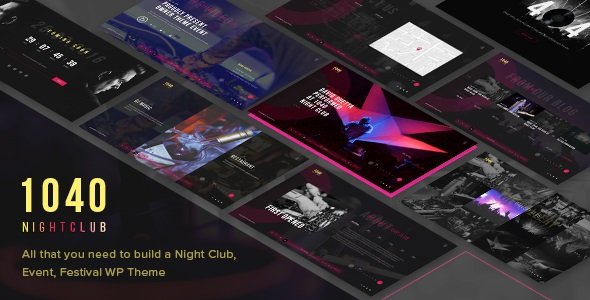
1040 Night Club – DJ, Party, Music Club WordPress Theme v1.2
Original price was: $49.00.$1.99Current price is: $1.99.
940
Items sold in last 4 weeks
39
People watching this product now!
Description
A successful music or nightlife website has to do more than look dramatic. It should communicate the atmosphere of the venue, show visitors what is happening next, introduce performers, and make media easy to explore on every screen. This WordPress theme is designed around that experience, giving clubs, DJs, bands, event promoters, recording studios, and live entertainment businesses a visual foundation that feels energetic without making essential information difficult to find.
Build A High-Energy Digital Home For Music And Events
The design direction suits projects where photography, video, bold typography, and event-focused calls to action carry the story. A nightclub can highlight upcoming parties and resident DJs, while a music group can use the same framework to present performances, releases, galleries, and contact details. Event organizers can arrange promotional pages around schedules and media, and recording studios can adapt the layouts to showcase services, equipment, artists, and recent work.
Fullscreen sliders and video backgrounds can give important campaigns a strong opening, but they can also be used selectively. A focused homepage might begin with a single event announcement, followed by artist profiles, a schedule, a gallery, and a booking prompt. This approach lets the design support the business goal instead of turning the page into a collection of unrelated effects.
Shape Pages Around The Audience Journey
Visitors to an entertainment website usually arrive with one of a few clear questions: What is happening, who is performing, what does the venue look like, and how can they attend or make contact? The included page-building workflow helps organize those questions into purposeful sections. WPBakery Page Builder support and dedicated content modules allow administrators to assemble pages visually, adjust content order, and reuse brand elements without writing every layout from scratch.
Flexible column arrangements can be useful for artist grids, sponsor displays, event highlights, service comparisons, or mixed media. Instead of forcing every page into one presentation, the theme supports layouts ranging from focused single-column stories to broader multi-column collections. That flexibility is particularly valuable when a site needs both immersive landing pages and practical information pages.
Present Events, Artists, And Media With Context
Music websites often contain different content formats, and each one deserves an appropriate presentation. Photo and video galleries can document previous events and establish the mood of a venue. Music-focused sections can introduce performers and help visitors discover their work. Event Calendar integration can support date-driven promotion, while Contact Form 7 compatibility provides a familiar way to build enquiry, reservation, or collaboration forms.
The theme is also prepared for multilingual workflows through WPML compatibility. This can help venues in tourist areas, festivals with international audiences, and artists serving listeners in multiple regions. Translation still needs to be configured and reviewed by the site owner, but the theme provides a more suitable starting point than a layout built only for one language.
Create A Distinct Visual Identity
Entertainment brands depend heavily on color, typography, motion, and imagery. Theme options provide controls for fonts, font sizes, heading treatments, body text, navigation, and other visual elements. Google Fonts and standard font choices can be used to build a recognizable typographic system, while color settings allow the interface to follow campaign artwork or an established venue identity.
Background controls support uploaded images, solid colors, and parallax treatments for full-width sections. These tools can help separate a lineup announcement from a gallery or make a booking section feel intentional. CSS animations are available for visual emphasis, although a restrained approach is recommended: reserve motion for priority content so the experience remains readable and performs well on mobile connections.
Responsive Design For Visitors On The Move
Many customers discover events from a phone while travelling, browsing social media, or coordinating plans with friends. The responsive layout is intended to adapt across desktop, tablet, and mobile screens. Before launch, administrators should still test the real content they add, especially large background videos, long event titles, embedded media, and complex forms. Responsive design works best when images are optimized, text remains concise, and primary actions are visible without unnecessary scrolling.
The theme includes icon fonts and modern front-end styling based on HTML5 and CSS3. These resources help create clear visual cues for navigation, social profiles, locations, dates, and contact information without relying on oversized image assets for every interface element.
A Practical Setup Approach
Start by installing WordPress on a secure hosting environment and creating a backup or staging site. Upload and activate the theme, then review the included documentation and required or recommended plugins. If demo-import tools are available in the downloaded package, import sample content only on a suitable installation and confirm that it will not overwrite material you need to keep.
After import, replace demo images, videos, text, links, schedules, and contact details with your own assets. Build the core navigation first, then configure the homepage, event pages, artist or service content, gallery, contact forms, and footer information. Review font licensing and media permissions, compress large images, avoid autoplay audio, and test important actions such as form submission on more than one device.
Plan Before Publishing
- Prepare optimized venue, artist, performance, and event images.
- Decide whether the homepage should prioritize tickets, bookings, schedules, or enquiries.
- Organize performer, event, gallery, and service content before importing a large demo.
- Test third-party plugins in a staging environment before using them on a live website.
- Check mobile menus, forms, sliders, videos, and event dates after customization.
- Maintain independent backups before changing themes or applying major updates.
Download This GPL WordPress Theme From GPLCARE
GPLCARE provides this downloadable WordPress theme for users who want to evaluate and build music, nightlife, event, and entertainment websites using GPL-distributed files. The download is intended for self-managed WordPress projects, so installation, customization, hosting, backups, and compatibility testing remain the user’s responsibility. Third-party developer support, hosted services, demo media, or premium account benefits are not automatically included unless they are specifically stated on the product page.
Explore more GPL WordPress themes when comparing layouts for events, creative businesses, portfolios, and online stores. Always check the product information and downloaded documentation, use a staging environment for evaluation, and confirm that the theme fits the technical requirements of your current WordPress setup before deploying it to a production website.
GPLCARE Updater Plugin
GPLCARE Updater Plugin Tutorial
New to GPLCARE? Watch this step-by-step tutorial to learn how to install, activate, and use the GPLCARE Updater Plugin directly from your WordPress dashboard.

Easy Installation Guide
Install the GPLCARE Updater Plugin in a few steps.

Update Management
Update themes and plugins directly from WordPress.

Tips & Best Practices
Keep your website updated and secure.
Support and updates
What is included?
Documentation You will find the item’s documentation within the .zip file you download.
Updates Available
You'll always have access to the latest features, fixes, and security updates. Simply re-download the item to get the most up-to-date files. You can find the updates change-log on the item’s description.
What is not included?
Author Support
Author support is not available for items downloaded on GPLCare. If you need support from this item’s author, we recommend you take a look at this item on Original Author. If support is offered, you will receive 6 months of support when you purchase the item there.
Technical support from GPLCare
GPLCare doesn’t offer technical support for individual items. If you need further assistance, please visit our Help center and create Support Tickets here.
Automatic updates All updates require manual installation.
Only logged in customers who have purchased this product may leave a review.
Related products

-92%
Original price was: $49.00.$3.99Current price is: $3.99.
-92%
Original price was: $49.00.$3.99Current price is: $3.99.
-92%
Original price was: $49.00.$3.99Current price is: $3.99.
-83%
Original price was: $29.00.$4.99Current price is: $4.99.
Reviews
Clear filtersThere are no reviews yet.