
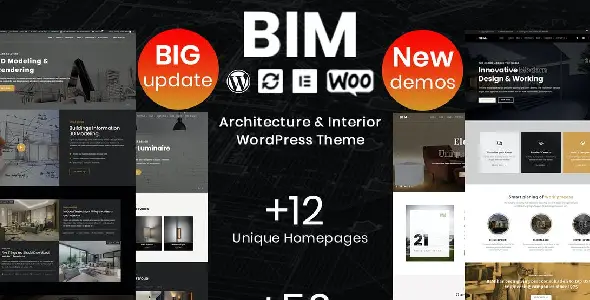

BIM – Architecture & Interior Design WP Theme for Studio-Ready WordPress Websites
BIM – Architecture & Interior Design WP Theme is built for professionals who need a polished online presence for architectural projects, interior design portfolios, renovation services, construction concepts, and creative studio branding. Instead of using a basic business template, this WordPress theme helps you present spaces, layouts, materials, floor plans, design concepts, and completed projects in a way that feels visual, premium, and client-focused.
For architects, interior decorators, design agencies, freelance visualizers, property consultants, and creative studios, a website is not just a digital visiting card. It is a project gallery, trust builder, enquiry generator, and brand presentation platform. BIM gives WordPress users a focused design foundation for creating a website that speaks directly to clients looking for professional design expertise.
Product Fit: What BIM Is Designed For
BIM belongs to the WordPress Theme category and is best suited for architecture, interior design, home styling, construction design, building consultancy, and creative portfolio websites. The name itself connects strongly with Building Information Modeling, modern architecture workflows, and design-led project presentation.
The purpose of this theme is to help users build a professional website where design quality, project details, visual storytelling, and service presentation work together. It can be used by a solo architect showcasing residential projects, an interior design firm presenting luxury apartment makeovers, or an agency building client websites for construction and design businesses.
Industry Match
The architecture and interior industry depends heavily on visual proof. Clients want to see style, finish quality, planning ability, and previous work before making contact. A theme like BIM fits this search intent because it allows website owners to create pages around portfolios, design services, studio information, consultation forms, project categories, and case-study-style content.
Target Audience Match
This theme is useful for WordPress users who want a ready-made design direction, developers who build websites for local design businesses, freelancers who need fast project delivery, agencies handling multiple client sites, bloggers writing about interiors, and even WooCommerce store owners selling digital design assets, decor products, or consultation packages.
From Blueprint to Browser: Presenting Architecture with Clarity
Architecture websites need structure. A visitor should quickly understand what type of work you do, what your design style looks like, and how they can contact you. BIM supports that kind of clean journey by giving your content a professional framework for project images, service sections, studio details, and call-to-action areas.
For an architecture firm, this can mean creating pages for residential design, commercial spaces, urban planning, 3D visualization, renovation planning, or construction documentation. Each service can be explained in simple language while portfolio sections show real work examples that support the claims.
This is important because design clients rarely buy only based on price. They look for confidence. A well-arranged architecture website can help explain your process, display completed projects, and guide visitors toward booking a consultation.
Interior Design Storytelling That Feels Premium
Interior design is emotional. People want to imagine how their home, office, showroom, cafe, or apartment could look after your work. BIM can be used to create a website experience where images, short descriptions, material ideas, layout concepts, and before-after style content work together.
Instead of only listing services, you can create pages that explain the feeling behind each design. For example, a bedroom design page can talk about comfort, lighting, storage planning, color harmony, and material selection. A commercial interior page can focus on customer flow, brand identity, space efficiency, and durability.
Useful Interior Website Sections
- Residential interior design for flats, villas, and apartments
- Office and workspace design for growing businesses
- Modular kitchen and wardrobe planning
- Retail showroom, salon, cafe, and restaurant interiors
- Luxury renovation and space transformation projects
- Design consultation and 3D concept visualization
Project Portfolios Built Around Space, Detail, and Outcome
A strong portfolio is the heart of any architecture or interior design website. BIM can help you organize your work in a way that feels more meaningful than a simple image gallery. You can present projects by category, room type, property type, style, location, or service.
For example, an interior designer may create separate portfolio groups for modern apartments, luxury living rooms, modular kitchens, office interiors, and commercial fit-outs. An architecture studio may organize work by villas, apartments, elevation design, commercial buildings, and landscape planning.
When writing project descriptions, it is helpful to include the client goal, design challenge, material direction, planning approach, and final result. This improves user experience and also gives search engines more relevant content to understand the page.
Portfolio Content Ideas
- Project name and location
- Property size or room type
- Design style such as minimalist, contemporary, luxury, rustic, or industrial
- Services delivered, such as planning, 3D design, execution, or renovation
- Short explanation of the design concept
- High-quality images that show the final result clearly
Consultation-Focused Pages for Better Client Enquiries
A beautiful design website should also convert visitors into leads. BIM can be used to create focused enquiry pages for architecture consultation, interior design packages, renovation quotes, or project discussion calls. This makes the website more useful for commercial intent, not just portfolio viewing.
For local businesses, enquiry forms are especially important. A visitor may want to ask about pricing, availability, design package details, or site visit options. Clear call-to-action buttons like “Book a Design Consultation,” “Request a Project Quote,” or “Discuss Your Interior Plan” can improve conversions.
Lead Generation Elements to Include
- Contact form for project enquiries
- Phone number and WhatsApp button for quick communication
- Service area details for local SEO
- Client testimonial sections for trust
- Process timeline explaining how the project starts
- FAQ section to answer common pricing and service questions
BIM vs a Generic Multipurpose WordPress Theme
A generic multipurpose theme can build many types of websites, but it often needs more customization to look suitable for architecture or interior design. BIM gives you a more niche-focused starting point. The layout direction, visual mood, and content style are more aligned with design studios, project galleries, and professional service presentation.
For developers and agencies, this can save setup time. Instead of forcing a corporate template to look like an architecture website, you can start with a theme that already matches the industry tone. That means faster delivery for client projects and less time spent redesigning basic sections.
For business owners, the advantage is clarity. The website feels connected to the service from the first screen, which helps visitors understand that they are dealing with an architecture or interior design brand, not a random business website.
WooCommerce Possibilities for Design-Based Businesses
Although BIM is mainly suitable for architecture and interior design presentation, WooCommerce users can also build commercial sections depending on their business model. A design studio may sell consultation packages, downloadable floor plan templates, decor products, lighting items, furniture collections, or digital design resources.
For example, an interior consultant could offer paid online consultation slots as WooCommerce products. A design blogger could sell room styling guides, home decor checklists, or premium design mood boards. An agency could sell fixed-price landing page packages for real estate and construction clients.
This makes BIM flexible for users who want both a professional portfolio and a product-selling option within the same WordPress website.
Developer and Agency Use Cases
For freelancers and agencies, BIM can work as a practical base theme for client projects in the architecture, construction, renovation, real estate design, and interior service industries. It gives developers a niche-ready design direction while still allowing customization through WordPress tools, page builders, plugins, and branding adjustments.
Possible Client Projects
- Architecture firm website with project portfolio
- Interior designer personal brand website
- Construction consultant landing page
- Renovation company service website
- 3D visualization and rendering portfolio
- Furniture studio or decor product showcase
- Real estate staging and property styling website
Agencies can also use the theme for faster mockups. When a client wants to see a website concept, a niche-specific architecture theme helps create a more convincing preview than a blank WordPress setup.
Search-Friendly Content Opportunities for Architecture Websites
BIM can support strong SEO when the website owner adds helpful, original, and location-focused content. Search engines need text, structure, and context, not only images. That is why project pages, service descriptions, FAQs, blog posts, and local landing pages are important.
For example, an architecture studio can target keywords like “residential architect in Kolkata,” “modern house elevation design,” “commercial interior designer,” “office renovation service,” or “3D interior visualization.” Interior designers can create blog articles around modular kitchen planning, small bedroom design, living room lighting, color combinations, and renovation budgeting.
Content Pages That Can Bring Organic Traffic
- Architecture services page
- Interior design packages page
- Project case studies with detailed descriptions
- Location-based service pages
- Design tips and renovation guides
- Client questions and consultation FAQs
Responsive Experience for Visual-Heavy Design Brands
Most visitors will view architecture and interior design websites from mobile devices before contacting the business. A theme in this niche should make images look attractive, text easy to read, and buttons simple to tap. BIM is suitable for creating a responsive website experience where project visuals remain central without making the page difficult to navigate.
Mobile presentation is especially important for WhatsApp-driven enquiries, local service searches, and social media traffic. If someone clicks from Instagram, Facebook, or Google Business Profile, they should quickly understand your work and contact you without confusion.
Real-World Website Ideas Using BIM
BIM can be used in many practical ways depending on the business model. A freelance architect may use it as a personal portfolio with a short biography, selected projects, and contact form. An interior design company may build a complete service website with packages, testimonials, and a project enquiry page.
A construction planning consultant could use it to explain building approval support, drawing services, floor planning, and site coordination. A 3D visualization artist could showcase photorealistic renders, walkthrough projects, and client presentation work. A furniture or decor brand could combine portfolio-style inspiration with WooCommerce product listings.
This flexibility makes the theme valuable for both direct business owners and professionals who create websites for clients.
Buying BIM from GPLCare
GPLCare.com provides WordPress products for users who want affordable access to themes and plugins for building professional websites. BIM – Architecture & Interior Design WP Theme is a good choice for anyone planning to create a website in the architecture, interior design, renovation, decor, or creative studio niche.
Before using the theme on a live website, it is always recommended to check your WordPress version, hosting performance, required plugins, demo import options, and image quality. Since design websites depend heavily on visuals, use properly compressed project images and write original content for every service and portfolio page.
Frequently Asked Questions About BIM – Architecture & Interior Design WP Theme
What is BIM – Architecture & Interior Design WP Theme used for?
BIM is used for creating WordPress websites for architects, interior designers, design studios, renovation businesses, 3D visualization experts, construction consultants, and creative portfolio brands.
Is BIM suitable for an interior design portfolio website?
Yes. BIM is suitable for showcasing interior projects, room designs, commercial spaces, renovation work, before-after content, service pages, and client enquiry sections.
Can architects use this theme for project case studies?
Yes. Architects can use it to present residential, commercial, elevation, planning, and visualization projects with images, descriptions, design concepts, and project details.
Can I use BIM for a WooCommerce website?
It can be useful for WooCommerce-based design businesses that want to sell consultation packages, decor items, digital design guides, templates, or related creative products.
Is this theme good for freelancers and agencies?
Yes. Freelancers and agencies can use BIM as a niche-ready foundation for client websites in architecture, interior design, construction planning, renovation, and decor industries.
Does BIM help with SEO?
The theme can support SEO-friendly website building when combined with original content, optimized images, clear headings, fast hosting, internal linking, local keywords, and useful service pages.
Who should buy BIM from GPLCare?
BIM is best for WordPress users, developers, agencies, freelancers, bloggers, and business owners who want to b




Reviews
Clear filtersThere are no reviews yet.