
-90%
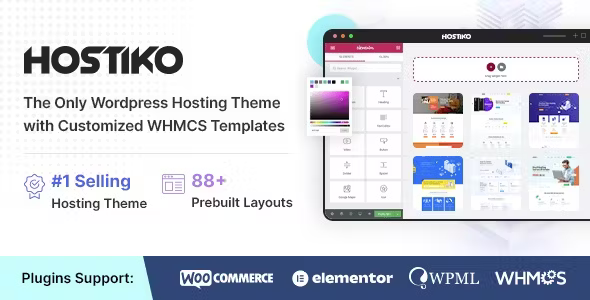
License: GPL | Version: v94.5.9 | Developer: Themeforest
This is The Exact Same File as Distributed by The Developer (Click Here)
Hostiko 2.0 WHMCS Hosting Theme v94.5.9
Original price was: $49.00.$4.99Current price is: $4.99.
419
Items sold in last 4 weeks
42
People watching this product now!
Description

Hostiko Theme is a WordPress hosting theme designed for web hosting companies, domain sellers, VPS providers, reseller hosting brands, cloud service businesses, server companies, and WHMCS-based hosting websites. It helps you build a polished hosting website where visitors can understand your plans, compare prices, search domains, and move toward ordering a service.
Although some users list it under WordPress plugin categories, Hostiko is not a normal plugin. It is a WordPress theme. That means it controls the main design of your website, including homepage sections, service pages, pricing tables, layouts, typography, colors, header, footer, and hosting-related landing pages.
The special part of Hostiko is its focus on the hosting industry. A normal business theme may give you a homepage and a few service sections. Hostiko goes deeper with hosting-specific layouts, domain search areas, VPS plan sections, dedicated server tables, WHMCS templates, pricing blocks, and design variations made for hosting brands.
For GPLCare users, Hostiko Theme GPL is useful when you want a premium hosting website design with flexible GPL access. It can be used for learning, testing, client work, agency projects, or building your own hosting brand under GPL terms.
Why Hosting Websites Need a Different Type of WordPress Theme
A hosting website is not the same as a simple company website. Visitors are not only reading about your business. They are comparing plans, checking storage, bandwidth, RAM, CPU, domains, renewal prices, support quality, uptime promises, security features, and billing flow.
If your website looks confusing, people may not trust your hosting service. Hosting is a trust-based business. Customers are giving you their website files, emails, domains, databases, and business projects. Your design must feel clear, stable, and professional.
Hostiko Theme helps by giving you a design structure made for hosting businesses. You can show shared hosting plans, VPS plans, dedicated server plans, reseller hosting, domain registration, cloud hosting, support sections, feature comparisons, testimonials, and call-to-action sections in a cleaner way.
This is why many people search for Hostiko Theme Free, Hostiko Theme GPL, or Hostiko Theme Latest Version. They want a hosting-focused WordPress theme that can save design time and help create a better first impression.
Hostiko Theme Details in a Simple Table
| Product Name | Hostiko – Hosting WordPress & WHMCS Theme |
| Product Type | WordPress Hosting Theme |
| Main Purpose | Building hosting company, domain, VPS, dedicated server, reseller hosting, and WHMCS websites |
| Best For | Web hosting companies, domain sellers, agencies, server providers, SaaS-style hosting brands, and freelancers |
| Builder Support | Elementor, WPBakery Page Builder, and Revolution Slider support depending on layout/package |
| Hosting Features | WHMCS templates, domain search sections, pricing tables, VPS sliders, dedicated server plan tables, landing pages, and demo layouts |
| Design Style | Modern, responsive, hosting-focused, business-ready, and conversion-oriented |
| GPLCare Use | Affordable GPL access for testing, client projects, learning, and WordPress hosting website development |
The Real Job of Hostiko: Turning Hosting Plans Into Clear Offers
Most hosting businesses offer similar services: shared hosting, WordPress hosting, cloud hosting, VPS, dedicated servers, email hosting, SSL, backups, and domain names. The challenge is not only having these services. The challenge is explaining them clearly.
A beginner may not understand the difference between shared hosting and VPS. A developer may want RAM, CPU, storage type, bandwidth, root access, and data center location. A business owner may only care about speed, support, security, and uptime. Your website needs to speak to all of them without becoming messy.
Hostiko gives you ready sections where hosting plans can be organized properly. You can create plan cards, comparison tables, VPS sliders, feature blocks, support sections, domain search areas, and call-to-action buttons. These elements help users move from confusion to decision.
WHMCS Support Makes Hostiko Useful for Real Hosting Businesses
WHMCS is widely used by hosting companies for billing, domain management, client accounts, invoices, support tickets, and automated hosting orders. A hosting WordPress theme becomes more useful when it can work smoothly with a WHMCS-based business flow.
Hostiko includes WHMCS-focused design support, including customized WHMCS templates for different layouts and shortcodes for showing WHMCS pricing inside WordPress. This is helpful because the public WordPress website and the WHMCS client area should feel like one brand.
When the WordPress homepage looks modern but the WHMCS area looks completely different, customers may feel they have moved to another website. That can reduce trust. Hostiko tries to solve this by offering matching design patterns for the hosting website and WHMCS pages.
Where WHMCS Helps in a Hosting Website
- Hosting plan ordering
- Domain registration and transfer flow
- Client login and account management
- Invoice generation and billing
- Support ticket management
- Service renewal and upgrade handling
- Automated hosting account setup when connected with supported systems
Domain Search, Pricing Tables, and VPS Sliders
Hosting websites need strong conversion sections. A visitor should quickly understand what you sell and how much it costs. Hostiko includes design elements that are useful for this type of website.
Domain Search Section
A domain search area is important if your hosting business sells domain names or connects domain registration with hosting plans. It gives visitors a quick way to check availability and start the buying journey.
Hosting Pricing Tables
Pricing tables are one of the most important parts of a hosting website. Hostiko helps you display shared hosting, WordPress hosting, VPS, cloud, reseller, or dedicated server plans in a structured way. Good pricing tables should show plan name, monthly price, storage, bandwidth, email accounts, SSL, backups, support, and order button.
VPS Slider
A VPS slider is useful when customers can adjust server resources such as CPU, RAM, storage, or bandwidth. It makes VPS pricing feel more interactive and easier to understand.
Dedicated Server Tables
Dedicated server plans often need more technical details. Stackable responsive tables can help show processor, RAM, storage, bandwidth, location, price, and setup options in a clean format.
100+ Layouts Give Agencies and Hosting Brands More Starting Points
Hostiko is known for offering many hosting-focused layout variations. This is useful because every hosting company does not want to look the same. One brand may prefer a clean corporate style. Another may want a bold technology look. Another may need a dark layout for cloud or server services.
Having many demos helps you choose a starting point that fits your brand style. It also saves time for agencies and freelancers who build websites for different hosting clients.
Still, demo import should be used carefully. Import only the layout you need. After importing, remove unused pages, replace sample images, update pricing, configure menus, rewrite content, and test all links. A demo is a starting point, not a finished website.
Elementor and WPBakery Editing Options
Hostiko supports popular visual building workflows, including Elementor and WPBakery depending on the selected layout. This is useful for users who do not want to edit code for every design change.
With a visual builder, you can edit hero sections, pricing blocks, hosting plan cards, service pages, testimonials, FAQ sections, domain search areas, and call-to-action sections. This makes Hostiko easier for beginners and faster for agencies.
For hosting websites, regular updates to design and offers are common. You may launch a discount campaign, change server pricing, add a new VPS plan, promote free migration, or highlight a new data center. Builder support makes those changes easier.
Practical Hosting Websites You Can Build With Hostiko
Shared Hosting Company Website
You can build a simple hosting website with homepage sections, shared hosting plans, WordPress hosting offers, free SSL highlights, support details, and domain search.
VPS and Cloud Server Business
Hostiko can be used for VPS, cloud hosting, and server-related websites. VPS sliders, technical plan tables, and feature sections help explain server resources more clearly.
Dedicated Server Provider
If you sell dedicated servers, you can show server specifications, data center locations, managed support, setup fees, and monthly pricing in structured tables.
Domain Registration Website
For domain-focused businesses, Hostiko can support a homepage with domain search, TLD pricing, transfer information, hosting bundles, and support sections.
Reseller Hosting Brand
Reseller hosting needs plan comparisons, white-label benefits, WHM/cPanel details, account limits, and upgrade paths. Hostiko gives you a design base for this type of offer.
Hosting Agency Landing Page
Freelancers and agencies can also use Hostiko for landing pages that promote managed WordPress hosting, website maintenance, email hosting, backups, security, and support plans.
SEO Value for Hosting Websites
Hostiko gives you a design foundation, but SEO depends on your content, technical setup, site speed, keyword targeting, internal links, backlinks, and user experience. A hosting theme can help present services properly, but it cannot rank your website by itself.
Hosting SEO is competitive. Many companies target keywords like web hosting, WordPress hosting, VPS hosting, cloud hosting, reseller hosting, dedicated server, cheap hosting, business email hosting, and domain registration. To compete, your website needs clear service pages and helpful content.
You should create separate pages for each main service. For example, do not put everything on one page. Create pages like Shared Hosting, WordPress Hosting, VPS Hosting, Dedicated Servers, Reseller Hosting, Domain Registration, Website Migration, and Support.
SEO Tips for Using Hostiko Theme
- Create separate landing pages for each hosting service.
- Use clear pricing tables with useful plan details.
- Add FAQs for beginners who do not understand hosting terms.
- Write original content instead of copying from other hosting companies.
- Add trust signals such as support hours, refund policy, uptime information, and migration help.
- Use Rank Math Pro or Yoast SEO Premium for meta titles, schema, sitemaps, and breadcrumbs.
- Optimize images, icons, sliders, and scripts for faster loading.
- Create blog posts around hosting education and common customer problems.
Speed and Performance: Important for Hosting Brand Trust
If you sell hosting, your own website must be fast. A slow hosting website sends the wrong message. Customers may think, “If their own site is slow, how will my website perform on their server?”
Hostiko includes modern responsive layouts, but final speed depends on your setup. Large sliders, heavy images, too many animations, unused plugins, poor hosting, and unoptimized scripts can slow down any WordPress website.
Use the theme with care. Keep pages focused. Compress images. Use only the sections you need. Avoid loading many demo elements on the homepage. Enable caching after setup. Use a CDN if your audience is spread across different regions.
Performance Checklist for Hostiko Websites
- Use WebP images for banners and illustrations.
- Limit homepage sliders and heavy animations.
- Remove unused demo pages and media files.
- Use only required plugins.
- Enable page caching and browser caching.
- Use object cache on a good VPS if possible.
- Test mobile performance, not only desktop scores.
- Check cart, domain search, WHMCS links, and client area after optimization.
Security and Trust Sections Your Hosting Site Should Include
Hosting customers care about security. Your website should not only look attractive. It should also explain how you protect customer websites and accounts.
Hostiko gives you space to create trust-focused sections. Use them wisely. Add details about SSL, backups, malware scanning, DDoS protection if available, secure data centers, support process, server monitoring, and account protection.
Do not make fake claims. If you do not offer 24/7 support, do not say it. If you do not provide daily backups, do not promise them. Hosting customers depend on honest service details.
Hostiko Theme GPL and GPLCare Usage Note
GPLCare provides WordPress products distributed under the General Public License. You can use GPL-licensed products for personal projects, client work, learning, testing, and development according to GPL terms.
Before downloading Hostiko Theme GPL, remember that GPL access may not include official license activation, direct author support, premium marketplace services, or automatic vendor updates unless clearly mentioned on the product page.
This is important for hosting themes because WHMCS-related setup can require proper configuration. If you need official author support, you should check the original marketplace option. If you need affordable access for WordPress development and testing, GPLCare can be a practical choice.
Who Should Use Hostiko Theme?
Hostiko is best for users who want to build a hosting-focused WordPress website with professional layouts and WHMCS-related design support.
- Hosting companies that need a modern website for plans and services.
- Domain sellers who want domain search and pricing sections.
- VPS providers who need resource-based plan presentation.
- Dedicated server businesses that need technical tables and data center details.
- Reseller hosting brands that need package comparisons and order buttons.
- Freelancers who build hosting websites for clients.
- Agencies that need many demo layouts and faster project delivery.
- Beginners who want a ready design instead of starting from scratch.
- Developers who need a WHMCS-friendly hosting theme base.
Who May Not Need Hostiko?
Hostiko is powerful, but it is not necessary for every WordPress website. If you are building a blog, portfolio, restaurant website, school website, or normal business site, a hosting theme may not be the right fit.
You may also avoid Hostiko if you do not sell hosting, domains, VPS, servers, or related technology services. The theme is built around hosting layouts, so using it for unrelated niches may require too much editing.
If your project is only a small landing page with one service and no WHMCS connection, you may prefer a lightweight Elementor template kit or a simple business theme.
Common Mistakes to Avoid With Hostiko
- Using demo content without rewriting: Replace all sample text with your real hosting plans, support details, and company information.
- Showing fake server specs: Only publish hosting features you actually provide.
- Ignoring WHMCS design consistency: Match colors, buttons, typography, and layout style between WordPress and WHMCS.
- Overloading the homepage: Too many sliders, animations, and sections can make the site slow.
- Not testing order buttons: Every pricing button should lead to the correct plan or WHMCS order page.
- Forgetting mobile users: Test pricing tables, menus, domain search, and CTA buttons on phones.
- Skipping backup before update: Always back up before updating the theme, builder plugins, or WHMCS templates.
Hostiko Theme Latest Version: Why It Matters
People search for Hostiko Theme Latest Version because hosting websites need stable compatibility. WordPress, PHP, page builders, WHMCS, and browser standards keep changing. An old theme can create layout issues, broken scripts, outdated templates, or security concerns.
ThemeForest shows Hostiko as an actively updated hosting theme, and the listing highlights 100+ demo variations, WHMCS customized templates, high sales, and recent update activity. That is important for users who want a theme that continues to support modern hosting website needs.
Before updating a live hosting website, take a full backup. Test the update on staging if possible. After updating, check homepage sections, WHMCS links, pricing tables, domain search, contact forms, sliders, mobile menus, and client area styling.
Useful GPLCare Products to Pair With Hostiko
Hostiko can become more effective when used with the right supporting tools. Avoid installing too many plugins. Choose only what helps your hosting website.
- Rank Math Pro or Yoast SEO Premium for SEO titles, schema, sitemap, breadcrumbs, and service page optimization.
- Elementor Pro for advanced landing pages and better design control.
- WP Rocket or another caching plugin for performance improvement.
- Slider Revolution for advanced hero sliders if your layout requires it.
- WPML if you need a multilingual hosting website.
- Contact Form 7 or another form plugin for sales inquiries and support contact forms.
- WooCommerce only if you sell extra digital products or services directly through WordPress outside WHMCS.
Pros and Cons of Hostiko Theme
| Pros | Cons |
| Designed specifically for hosting companies and domain businesses | Not suitable for unrelated niches without heavy customization |
| Includes many hosting-focused demo layouts | Too many demo options may confuse beginners at first |
| Supports WHMCS-related design workflows | WHMCS license and setup are separate responsibilities |
| Useful sections for pricing, VPS, domains, dedicated servers, and support | Performance depends on hosting, images, sliders, and plugin choices |
| Works with popular visual builders depending on layout | Builder-based pages can become heavy if not optimized |
| Good for agencies building hosting client websites | Requires careful testing of WHMCS links and order flow |
Simple Setup Path for a Clean Hostiko Website
Step 1: Plan Your Hosting Services
Before installing the theme, list your services. Decide whether you offer shared hosting, WordPress hosting, VPS, dedicated servers, reseller hosting, email hosting, domain registration, SSL, migration, or maintenance.
Step 2: Prepare Your Pricing
Create clear pricing plans with limits and features. Do not publish unclear plan names. Customers should quickly understand what each package includes.
Step 3: Install WordPress and Hostiko
Install WordPress on a clean hosting account. Upload Hostiko Theme, activate it, and install the required plugins for your selected layout.
Step 4: Import One Suitable Demo
Choose one demo that matches your hosting brand. Do not import many layouts unless you know how to clean the extra content.
Step 5: Connect WHMCS Flow Carefully
Set up WHMCS separately and connect order buttons, domain search sections, client login links, and product plans properly. Test every customer path.
Step 6: Rewrite All Content
Replace demo text with your own service details. Add real company information, support policy, refund policy, server details, data center locations, and terms.
Step 7: Test Before Launch
Test desktop, mobile, pricing buttons, contact forms, domain search, WHMCS cart, client login, SSL, page speed, and email notifications before sending traffic to the website.
Frequently Asked Questions About Hostiko Theme GPL
Is Hostiko a WordPress theme or plugin?
Hostiko is a WordPress theme made for hosting and WHMCS websites. It is not a normal WordPress plugin, although it works with plugins and builders to create hosting website layouts.
What is Hostiko Theme best used for?
Hostiko is best for web hosting companies, VPS providers, domain registration businesses, dedicated server sellers, reseller hosting brands, and WHMCS-based hosting websites.
Can I use Hostiko Theme GPL for client projects?
Yes, GPL-licensed WordPress products can generally be used for personal and client projects under GPL terms. Always check GPLCare product details before using it on a live project.
Does Hostiko include WHMCS license?
No. A WHMCS license is separate. Hostiko provides theme and design support for WHMCS-related website workflows, but WHMCS software licensing and billing setup are separate responsibilities.
Can Hostiko work without WHMCS?
Yes, you can use Hostiko as a hosting company WordPress website without WHMCS. However, if you want automated hosting orders, billing, invoices, and client management, WHMCS or another billing system is usually needed.
Does Hostiko support Elementor?
Yes, Hostiko includes Elementor-based layouts. Some layouts may also use WPBakery Page Builder and Revolution Slider, so check the package and selected demo before setup.
Is Hostiko good for VPS hosting websites?
Yes, Hostiko is suitable for VPS hosting websites. It includes hosting-focused sections such as VPS sliders, pricing tables, service pages, and technical plan layouts.
Can I build a domain selling website with Hostiko?
Yes, Hostiko includes domain search and hosting business sections that can be used for domain registration and domain-related service websites.
Is Hostiko Theme Free safe to download?
Be careful with random free downloads. Unknown sources may include outdated or modified files. Use a trusted GPL provider like GPLCare or the official marketplace source.
What should I check after installing Hostiko?
Check demo import, homepage sections, pricing buttons, WHMCS links, domain search, contact forms, mobile menu, page speed, SSL, and all order paths before launching.
Final Word: Hostiko Gives Hosting Brands a Ready Professional Base
Hostiko Theme is a strong choice for anyone building a WordPress website for web hosting, domain registration, VPS, cloud services, dedicated servers, reseller hosting, or WHMCS-based business operations. It is not a general-purpose theme trying to fit every niche. Its real strength is hosting-focused design.
With ready layouts, pricing tables, domain search sections, WHMCS templates, builder support, and responsive design, Hostiko can save a lot of setup time. But the final result depends on how carefully you use it. Rewrite the demo content, keep pricing clear, match your WHMCS area with your WordPress design, optimize performance, and test every order button before launch.
If you want a professional hosting website base with GPL access, Hostiko Theme GPL from GPLCare is a practical option for developers, agencies, freelancers, hosting startups, and business owners.
Download Hostiko Theme GPL from GPLCare and start building a clean, trusted, and conversion-ready hosting website today.
GPLCARE Updater Plugin
GPLCARE Updater Plugin Tutorial
New to GPLCARE? Watch this step-by-step tutorial to learn how to install, activate, and use the GPLCARE Updater Plugin directly from your WordPress dashboard.

Easy Installation Guide
Install the GPLCARE Updater Plugin in a few steps.

Update Management
Update themes and plugins directly from WordPress.

Tips & Best Practices
Keep your website updated and secure.
Support and updates
What is included?
Documentation You will find the item’s documentation within the .zip file you download.
Updates Available
You'll always have access to the latest features, fixes, and security updates. Simply re-download the item to get the most up-to-date files. You can find the updates change-log on the item’s description.
What is not included?
Author Support
Author support is not available for items downloaded on GPLCare. If you need support from this item’s author, we recommend you take a look at this item on Original Author. If support is offered, you will receive 6 months of support when you purchase the item there.
Technical support from GPLCare
GPLCare doesn’t offer technical support for individual items. If you need further assistance, please visit our Help center and create Support Tickets here.
Automatic updates All updates require manual installation.
Only logged in customers who have purchased this product may leave a review.
Related products
-96%
Original price was: $49.00.$1.99Current price is: $1.99.

-96%
Original price was: $49.00.$1.99Current price is: $1.99.

-96%
Original price was: $49.00.$1.99Current price is: $1.99.

-94%
Original price was: $49.00.$2.99Current price is: $2.99.
Reviews
Clear filtersThere are no reviews yet.