
-92%
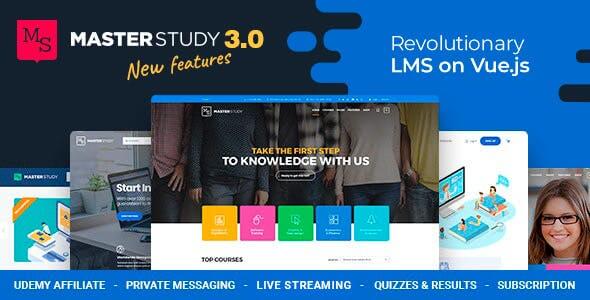
License: GPL | Version: v4.8.162 | Developer: Themeforest
This is The Exact Same File as Distributed by The Developer (Click Here)
Masterstudy Theme v4.8.162 & Education WordPress Theme
Original price was: $49.00.$3.99Current price is: $3.99.
968
Items sold in last 4 weeks
19
People watching this product now!
Description

Masterstudy – Education WordPress Theme Overview
Masterstudy – Education WordPress Theme is built for creating professional online learning websites, course marketplaces, school portals, training platforms, coaching websites, and educational business websites with WordPress. It is designed for educators who want to publish courses, manage learning content, promote instructors, and create a smooth student experience without building an LMS website from zero.
This theme is especially useful for online academies, coaching centers, tutors, universities, training institutes, course creators, skill development platforms, and agencies building education websites for clients. Instead of using a general-purpose WordPress theme and trying to turn it into a learning platform, Masterstudy gives you an education-focused structure from the beginning.
Product Analysis
- Product Name: Masterstudy – Education WordPress Theme
- Category: WordPress Theme
- Purpose: To build online course websites, LMS platforms, school websites, coaching portals, training academies, and education marketplaces.
- Industry: Online education, eLearning, coaching, academic institutions, professional training, digital courses, and skill development.
- Target Audience: WordPress users, developers, freelancers, agencies, bloggers, tutors, course creators, educational institutes, and business owners.
Building an Online Learning Website With a Real Course Structure
A successful education website needs more than attractive pages. It should help students discover courses, understand what they will learn, follow lessons, track progress, view instructor details, and complete the learning journey with confidence. Masterstudy is created around this purpose, making it a strong choice for anyone planning to build a serious learning platform with WordPress.
With Masterstudy, you can create a website where courses are organized professionally, lessons are easy to access, and educational content feels structured instead of scattered. This is a major advantage for course creators and training centers because learners usually trust websites that look organized, modern, and simple to use.
For developers and agencies, the theme can reduce project delivery time. You get a ready-made education website foundation, while still having room to customize branding, homepage sections, course layouts, instructor pages, and marketing content according to the client’s business model.
Course Presentation That Helps Students Make Decisions
When students visit an online course website, they usually want quick answers. What is the course about? Who is teaching it? What topics are covered? Is it beginner-friendly? How much does it cost? Can they trust the platform? Masterstudy helps present this information in a clear and conversion-focused way.
Organized Course Pages for Better Learning Clarity
Masterstudy allows educational websites to display course information in a structured format. A good course page can include the course title, description, curriculum, instructor information, pricing details, learning outcomes, duration, category, and enrollment options. This type of layout makes it easier for students to compare courses and choose the right one.
For example, a digital marketing academy can create separate pages for SEO, Google Ads, social media marketing, email marketing, and content writing. A programming institute can organize courses by PHP, JavaScript, Python, Flutter, WordPress, and web development. This improves navigation and gives students a clear learning path.
Curriculum Layouts That Feel Like a Real LMS
A normal blog-style website is not enough for online education. Students need lessons, modules, quizzes, assignments, and progress-based learning. Masterstudy is designed for LMS-style websites, making it easier to present course content in a way that feels professional and practical.
This helps course creators create a more complete learning experience. Instead of uploading random videos or PDFs, they can build a proper course flow where students move from one topic to the next with a sense of direction.
Student Journey From Enrollment to Learning
The student experience is one of the most important parts of an education website. If a learner finds the website confusing, they may leave before enrolling. Masterstudy focuses on creating a smooth journey from course browsing to enrollment and learning access.
Simple Course Discovery
Students should be able to find suitable courses without wasting time. Masterstudy supports education-focused browsing experiences where courses can be displayed by category, subject, instructor, level, price, or learning goal. This is useful for websites with multiple courses and different types of learners.
A coaching website can separate school-level courses, competitive exam training, and professional skill courses. An online academy can create categories for beginners, intermediate learners, and advanced students. Clear structure improves usability and can increase enrollment rates.
Learning Dashboard Experience
For a professional LMS website, students need an area where they can access enrolled courses, continue lessons, view progress, and manage learning activities. Masterstudy is useful for creating this type of learning environment with WordPress.
This kind of student-focused system helps improve trust because learners feel they are joining a proper education platform, not just purchasing a random product page.
Instructor and Training Institute Branding
Education websites are highly trust-based. Students want to know who is teaching, what experience the instructor has, and why they should learn from that platform. Masterstudy gives education businesses a professional way to present instructors, course authors, trainers, and academic teams.
Instructor Profiles That Build Credibility
Instructor profiles can help increase course sales because students often choose courses based on teacher reputation. With Masterstudy, you can showcase trainer bios, expertise, achievements, course lists, and teaching background in a clean format.
This is especially useful for coaching centers, online tutors, professional consultants, and institutes where the teacher’s personal brand plays a major role in student decisions.
Institution-Level Presentation
Masterstudy is also suitable for schools, colleges, universities, and training organizations that need a polished online presence. You can create sections for academic programs, admission information, course catalogs, faculty members, testimonials, contact details, and learning resources.
For offline institutes moving into online education, this theme can help combine traditional institutional credibility with modern eLearning functionality.
Selling Courses With WordPress and WooCommerce
Many education websites are not only informational; they are also commercial platforms. Course creators and training businesses often need to sell paid courses, offer bundles, create membership plans, or manage online payments. Masterstudy can support this type of business model when combined with the right WordPress and WooCommerce setup.
Course Monetization Ideas
- Sell individual online courses to students.
- Create paid training programs for professional learners.
- Offer free introductory lessons and premium advanced courses.
- Build coaching packages for exam preparation.
- Create instructor-based course marketplaces.
- Offer certification-style learning programs.
- Sell recorded classes, live course access, or downloadable learning materials.
This makes Masterstudy a practical option for anyone who wants to turn educational knowledge into an online business. Whether you are a solo tutor or a large training company, the theme gives you a strong base for presenting and selling learning content professionally.
Designed for Tutors, Academies, and eLearning Entrepreneurs
Masterstudy is flexible enough for different types of education projects. A private tutor can use it to promote courses and collect student leads. A coaching center can use it to publish batches, subjects, fees, and admission details. An online academy can use it to create a full LMS website with multiple instructors and paid courses.
For Individual Course Creators
If you are a teacher, mentor, blogger, or consultant, Masterstudy can help you build a branded course website where your knowledge becomes a digital product. You can create course pages, explain your teaching method, add testimonials, and guide visitors toward enrollment.
For Coaching Centers
Coaching centers can use Masterstudy to promote exam preparation courses, online classes, classroom programs, and skill-based training. The theme can help create a more professional image compared with a basic business website.
For Agencies and Freelancers
Freelancers and web development agencies can use Masterstudy to build education websites faster for clients. Since the theme is made for the education niche, it provides a better starting point than a regular multipurpose WordPress theme.
Education Website Design That Supports Marketing
An LMS website should not only teach students after enrollment; it should also convince visitors before enrollment. Masterstudy includes layouts and content areas that can support marketing-focused pages such as homepages, landing pages, course category pages, instructor sections, testimonials, and call-to-action blocks.
You can use these sections to explain course value, highlight student success stories, show learning outcomes, promote discounts, and guide visitors toward registration. This is important because online education is competitive, and students often compare multiple course platforms before making a decision.
Masterstudy Compared With a Generic WordPress Theme
A normal business theme can create a good-looking website, but it usually does not include the structure needed for online learning. You may need extra plugins, custom templates, course layouts, student dashboard styling, and manual development to make it work as an LMS platform.
Masterstudy is more suitable for education websites because it is built around courses, students, instructors, learning content, and training businesses. Compared with a generic WordPress theme, it gives you a more focused foundation for creating course pages, educational landing pages, learning dashboards, and instructor-based websites.
This makes it a better choice for users searching for an education WordPress theme, LMS WordPress theme, online course theme, eLearning website template, or coaching institute WordPress theme.
SEO Opportunities for Online Course Websites
Education websites can perform well in search engines when their content is properly planned. With Masterstudy, you can build SEO-friendly course pages and target keywords related to your learning niche. For example, you can create pages for “online web development course,” “digital marketing training,” “spoken English classes,” “competitive exam coaching,” “WordPress course,” or “professional skill development program.”
To improve SEO, you should add unique course descriptions, detailed curriculum information, instructor bios, student FAQs, reviews, learning outcomes, and blog content around your subject. You can also create location-based pages if your institute serves a specific city or region.
The theme gives you the visual and structural foundation, but strong SEO content will help attract organic traffic and convert visitors into students.
Practical Website Ideas You Can Create With Masterstudy
- Online course selling website for digital products and training programs.
- Coaching center website for exam preparation and academic support.
- University or college website with program information and faculty pages.
- Skill development platform for job-ready learning.
- Instructor marketplace where multiple teachers can publish courses.
- Language learning website for spoken English or foreign language classes.
- Corporate training portal for employee learning and development.
- Freelancer training website for design, coding, marketing, or business skills.
Setup Planning for a Better Learning Platform
Before using Masterstudy, it is helpful to plan your course structure clearly. Decide what subjects you will offer, how lessons will be organized, whether courses will be free or paid, and how students will enroll. Also prepare your instructor profiles, course images, pricing model, certificates, FAQs, and contact details.
A well-planned education website looks more trustworthy and saves time during development. If you are building a client project, preparing these details early can also make the website launch faster and smoother.
Masterstudy Theme FAQs
What is Masterstudy – Education WordPress Theme used for?
Masterstudy is used to build online course websites, LMS platforms, coaching institute websites, school portals, training academy websites, and eLearning marketplaces with WordPress.
Can I sell online courses with Masterstudy?
Yes. Masterstudy can be used to create paid course websites when combined with the proper WordPress, LMS, and WooCommerce setup. You can sell individual courses, training programs, or educational packages.
Is Masterstudy suitable for coaching centers?
Yes. Coaching centers can use Masterstudy to display courses, batches, subjects, instructor details, admission information, pricing, and online learning content.
Can I create an LMS website without custom development?
Masterstudy gives you a ready-made education website structure, which reduces the need for custom development. Basic WordPress knowledge is still helpful for setup, customization, and content management.
Is Masterstudy good for individual tutors?
Yes. Individual tutors can use Masterstudy to create a personal teaching brand, publish course details, collect student leads, and sell online learning programs.
Can agencies use Masterstudy for client projects?
Yes. Masterstudy is useful for freelancers and agencies because it provides education-focused layouts and LMS-ready website structure, making it faster to build course websites for clients.
Is Masterstudy better than a multipurpose theme for education websites?
For education and course-based websites, Masterstudy is usually a better fit than a normal multipurpose theme because it is designed around courses, instructors, students, learning content, and LMS workflows.
Can I use Masterstudy for a course marketplace?
Yes. Masterstudy can be used for course marketplace-style websites where multiple instructors, course categories, and paid learning programs are part of the platform structure.
Create a Complete Education Website With Masterstudy
Masterstudy – Education WordPress Theme is a strong choice for building a modern learning website with WordPress. It helps you create a professional online education platform with course pages, instructor presentation, student-focused layouts, LMS-style structure, and monetization possibilities.
If you want to build an online academy, coaching website, training portal, course selling platform, or education marketplace, Masterstudy gives you a practical starting point. It saves development time, improves course presentation, and helps create a trustworthy learning experience for students.
GPLCARE Updater Plugin
GPLCARE Updater Plugin Tutorial
New to GPLCARE? Watch this step-by-step tutorial to learn how to install, activate, and use the GPLCARE Updater Plugin directly from your WordPress dashboard.

Easy Installation Guide
Install the GPLCARE Updater Plugin in a few steps.

Update Management
Update themes and plugins directly from WordPress.

Tips & Best Practices
Keep your website updated and secure.
Support and updates
What is included?
Documentation You will find the item’s documentation within the .zip file you download.
Updates Available
You'll always have access to the latest features, fixes, and security updates. Simply re-download the item to get the most up-to-date files. You can find the updates change-log on the item’s description.
What is not included?
Author Support
Author support is not available for items downloaded on GPLCare. If you need support from this item’s author, we recommend you take a look at this item on Original Author. If support is offered, you will receive 6 months of support when you purchase the item there.
Technical support from GPLCare
GPLCare doesn’t offer technical support for individual items. If you need further assistance, please visit our Help center and create Support Tickets here.
Automatic updates All updates require manual installation.
Only logged in customers who have purchased this product may leave a review.
Related products
-94%
Original price was: $49.00.$2.99Current price is: $2.99.

-96%
Original price was: $49.00.$1.99Current price is: $1.99.
-96%
Original price was: $49.00.$1.99Current price is: $1.99.
-92%
Original price was: $49.00.$3.99Current price is: $3.99.
Reviews
Clear filtersThere are no reviews yet.