
-92%
License: GPL | Version: v6.0 | Developer: Themeforest
This is The Exact Same File as Distributed by The Developer (Click Here)
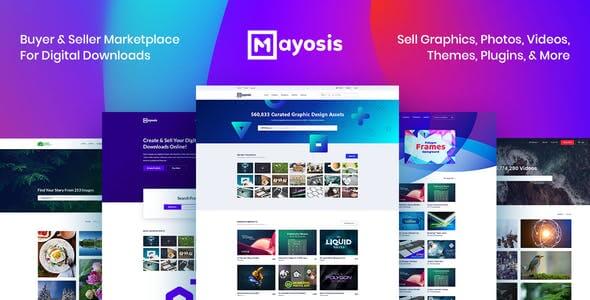
Mayosis Theme v6.0 – Digital Marketplace Theme
Original price was: $49.00.$3.99Current price is: $3.99.
46
Items sold in last 4 weeks
19
People watching this product now!
Description
Mayosis – Digital Marketplace WordPress Theme Overview
Mayosis – Digital Marketplace WordPress Theme is built for anyone who wants to create a professional digital product store or marketplace using WordPress. It is especially useful for selling downloadable products such as templates, graphics, fonts, music, ebooks, software, online courses, stock photos, UI kits, code snippets, plugins, and other creative assets.
Unlike a normal blog theme or basic WooCommerce theme, Mayosis focuses on the digital selling experience. That means the design, product layout, checkout flow, vendor-friendly structure, and marketplace presentation are created with digital downloads in mind. For GPLCare users, developers, agencies, freelancers, bloggers, and online store owners, this theme can be a practical starting point for launching a modern marketplace similar in concept to platforms like ThemeForest, Creative Market, Etsy-style digital shops, or independent software stores.
Product Analysis
- Product Name: Mayosis – Digital Marketplace WordPress Theme
- Category: WordPress Theme
- Purpose: To build a digital download store, software shop, creative asset marketplace, or multi-vendor digital product platform.
- Industry: Digital products, online marketplaces, WordPress eCommerce, software sales, creative downloads, and digital entrepreneurship.
- Target Audience: WordPress users, developers, freelancers, web agencies, bloggers, eCommerce store owners, template sellers, and digital creators.
Building a Download-First Marketplace with WordPress
Mayosis is designed for people who do not want their digital store to look like a physical product shop. Digital products need a different presentation style. Customers want to see previews, product details, version information, author details, pricing, download access, support information, and clear purchase buttons without unnecessary clutter.
With Mayosis, you can create a clean digital marketplace where every product feels organized and easy to browse. Whether you are selling WordPress themes, design templates, audio files, ebooks, presets, icons, or software tools, the theme helps present those items in a way that feels suitable for digital buyers.
This makes the theme useful for single sellers as well as marketplace owners. A solo creator can use it to sell personal digital files, while an agency or entrepreneur can build a larger marketplace where multiple vendors list their products through compatible marketplace extensions.
Designed for Digital Sellers, Not Just General eCommerce
A general eCommerce theme can sell almost anything, but that does not always mean it is ideal for downloadable products. Mayosis is more focused. It gives your website a digital-product personality from the beginning, which is important when you are trying to build trust with customers who are buying files instead of physical goods.
Good Fit for Creative Product Stores
If you sell design resources, Mayosis can help you create a polished storefront for items such as:
- UI kits and website templates
- Logo packs and branding assets
- Fonts, icons, illustrations, and graphics
- Stock images, mockups, and presentation files
- Video templates, presets, and digital media files
Useful for Developers and Software Sellers
Developers can also use Mayosis for selling software-related products. For example, you can create a store for WordPress plugins, PHP scripts, app templates, code snippets, SaaS resources, or license-based digital tools. The product layout can be used to explain what the item does, show screenshots, list technical details, and guide visitors toward purchase.
Helpful for Bloggers and Course Creators
Bloggers, educators, and content creators can use Mayosis to sell ebooks, guides, downloadable worksheets, course resources, PDF bundles, or premium learning materials. Instead of using a plain product page, the theme allows digital content to appear more professional and conversion-focused.
Easy Digital Downloads and Marketplace Workflow
Mayosis is commonly associated with Easy Digital Downloads, a WordPress eCommerce plugin built specifically for selling digital products and downloadable files. Easy Digital Downloads supports digital store functions such as shopping cart, payment processing, customer management, discount codes, file delivery, and reporting.
This matters because a digital marketplace needs more than a good-looking homepage. It needs a system that can manage purchases, file access, customer records, and download delivery. Mayosis works well for this type of store structure because its design is aligned with digital selling instead of physical shipping.
Single Vendor Store Setup
For a single seller, Mayosis can be used to create a focused digital product shop. You can list your own products, organize them into categories, write detailed descriptions, add previews, and give customers a smooth way to buy and download.
Multi-Vendor Marketplace Potential
For marketplace-style websites, Mayosis can be used with compatible Easy Digital Downloads marketplace extensions such as Frontend Submissions and commission-related tools, depending on your site setup and plugin availability. This type of workflow allows different sellers to submit products, manage listings, and sell through your platform.
This is useful if you want to build a digital marketplace where designers, developers, photographers, musicians, or educators can sell their own products while your website manages the overall platform experience.
Marketplace Layouts That Help Customers Browse Faster
A strong digital marketplace should make discovery easy. Visitors may not always know the exact product name they need. They may browse by category, price, popularity, file type, niche, or use case. Mayosis supports a marketplace-style browsing experience where products can be presented in a clean and organized way.
Product Cards for Quick Decision Making
Digital buyers often compare several products before purchasing. A good product card can help them quickly understand what is being sold. Mayosis gives your listings a more marketplace-ready appearance, making it easier to show product title, image preview, price, category, and action buttons.
Category-Based Store Navigation
If your store has multiple product types, categories become very important. A marketplace selling fonts, themes, plugins, graphics, and ebooks needs clear navigation. Mayosis helps you organize product sections so customers can move from one niche to another without feeling lost.
Search-Friendly Product Discovery
For stores with many downloads, search and filtering can improve the buying experience. When visitors can quickly find the right product, they are more likely to stay on the site, compare options, and complete the checkout.
Digital Product Pages Built for Trust and Conversion
When someone buys a digital product, they want confidence before checkout. They cannot touch the product physically, so the page must do the selling through previews, clear information, and professional presentation. Mayosis gives you a structure where you can explain the value of each digital item in detail.
Better Space for Product Storytelling
Instead of simply adding a title and price, you can use product pages to explain what the file includes, who it is for, how it can be used, and what problem it solves. This is especially helpful for templates, software, ebooks, and creative assets where buyers need details before making a decision.
Preview-Focused Selling
For digital products, visuals can strongly influence conversions. A clean product preview can help visitors understand quality before purchase. Mayosis is suitable for stores where screenshots, mockups, thumbnails, and visual examples are important.
Clear Purchase Journey
A good digital product page should make the buying process simple. Visitors should understand the product, trust the seller, see the price, and know what happens after purchase. Mayosis helps create a more focused journey from product discovery to checkout.
Page Builder Flexibility for Custom Marketplace Design
Mayosis is known for supporting popular visual page-building workflows, which can help users customize pages without writing everything from scratch. Some listings and reviews mention compatibility with Elementor and WPBakery page builder options, depending on the version and setup being used.
This flexibility is useful for agencies and freelancers who build client websites. You can create landing pages, promotional sections, product grids, vendor highlights, featured collections, and homepage blocks that match the brand identity of the marketplace.
Useful Sections You Can Create
- Featured digital downloads
- Top-selling marketplace items
- Newly added products
- Creator or vendor highlights
- Category-based product showcases
- Special offer and discount sections
- Blog content for SEO and product education
This makes Mayosis more than a product listing theme. It can also support marketing pages that help explain your marketplace, promote sellers, and guide customers toward popular downloads.
Real-World Use Cases for Mayosis
Mayosis can be used in many practical business models. Its strength is that it fits different types of digital product websites without feeling too limited to one niche.
WordPress Theme and Plugin Store
If you sell WordPress themes, plugins, child themes, Elementor templates, or website kits, Mayosis can help create a professional download store. Product pages can include screenshots, compatibility notes, version details, and setup instructions.
Graphics and Design Asset Marketplace
Designers can use Mayosis to sell fonts, icons, logo templates, mockups, social media templates, and brand kits. A marketplace-style layout makes it easier for customers to browse collections and compare products.
Software and Code Marketplace
Developers can use it to create a store for scripts, app source code, UI components, admin panels, and digital tools. The product description area can explain technical features, installation requirements, and license details.
Digital Learning Resource Store
Educators and bloggers can sell ebooks, guides, PDFs, templates, worksheets, and course resources. Mayosis gives these products a more premium look compared to a normal blog download page.
How Mayosis Compares with a Regular WooCommerce Theme
A regular WooCommerce theme is often designed around physical products such as clothing, electronics, furniture, or accessories. Those stores usually need shipping details, stock status, size options, and physical product galleries. Mayosis is more suitable when your main business is selling downloadable digital files.
For example, if you are building a fashion store, a general WooCommerce theme may be better. But if you are building a digital template marketplace, stock media store, software shop, or creative download platform, Mayosis feels more relevant because the layout and marketplace concept match that purpose.
Mayosis vs General Blog Theme
A blog theme can publish content, but it will not naturally create a strong buying experience for digital products. Mayosis gives you product-focused layouts, marketplace-style browsing, and a more commercial design direction.
Mayosis vs Basic Shop Theme
A basic shop theme may support product sales, but Mayosis is more focused on digital downloads, creative marketplaces, and vendor-style product presentation. This makes it a better choice for digital entrepreneurs who want a marketplace identity from day one.
SEO Value for Digital Marketplace Websites
Digital product websites depend heavily on organic search. People search for terms like “download website template,” “best UI kit,” “premium WordPress plugin,” “ebook bundle,” “stock photo pack,” or “software script.” Mayosis gives you a strong visual base, while your SEO strategy can focus on product descriptions, category pages, blog content, and internal linking.
Content Ideas for a Mayosis Website
- Product comparison articles
- How-to tutorials using your digital products
- Best template collection posts
- Software setup guides
- Design resource roundups
- Case studies showing how customers use your products
With the right content strategy, a Mayosis-powered website can target both informational and commercial keywords. For example, a visitor may first read a guide about building a landing page, then purchase a landing page template from your marketplace.
Customer Experience After Purchase
For digital products, the post-purchase experience is just as important as the design. Customers expect quick access to their files, simple account management, clear download links, and reliable purchase history. When paired with the right digital commerce plugin setup, Mayosis can support a smoother customer journey from browsing to downloading.
This is important for repeat sales. If customers can easily access their purchased files and trust your store, they are more likely to come back for future downloads.
Best For These Website Owners
Mayosis is a strong match for users who want to turn WordPress into a digital selling platform. It is especially useful for:
- Developers selling plugins, scripts, or app templates
- Designers selling graphics, fonts, and creative assets
- Agencies building digital stores for clients
- Bloggers selling ebooks, guides, and premium downloads
- Marketplace owners planning a multi-vendor digital platform
- Freelancers who want to sell reusable templates or resources
- Entrepreneurs launching a niche digital product business
Before You Install Mayosis
To get the best result from Mayosis, plan your marketplace structure before installation. Decide what type of products you will sell, how categories should be organized, whether you need single-vendor or multi-vendor functionality, and which payment or download management plugin setup is suitable for your business.
Recommended Planning Checklist
- Prepare your product categories before importing demo content.
- Create high-quality preview images for each digital item.
- Write detailed product descriptions with use cases and file information.
- Set up secure payment and download delivery settings.
- Create important pages such as Terms, Privacy Policy, Refund Policy, and Contact.
- Use blog content to bring organic traffic to your marketplace.
Mayosis for GPLCare Users
For GPLCare users, Mayosis can be a valuable WordPress theme when the goal is to build a digital download store or marketplace without starting from a blank design. It gives you a niche-focused foundation for selling digital products and presenting them professionally.
If you are a developer, freelancer, agency, blogger, or eCommerce store owner, this theme can help you create a marketplace-style website with a polished appearance and practical digital selling structure. Instead of forcing a physical shop theme to work for downloads, Mayosis gives you a design direction that already understands the digital product business.
Frequently Asked Questions About Mayosis
What is Mayosis WordPress Theme used for?
Mayosis is used for creating digital product stores and online marketplaces with WordPress. It is suitable for selling downloadable items such as templates, software, graphics, ebooks, music, fonts, courses, photos, and creative assets.
Is Mayosis good for a multi-vendor marketplace?
Yes, Mayosis can be used for marketplace-style websites when combined with suitable digital marketplace extensions. This allows multiple sellers or vendors to submit and sell digital products through your website, depending on your plugin setup.
Can I use Mayosis for selling WordPress themes and plugins?
Yes. Mayosis is a good option for selling WordPress themes, plugins, templates, code snippets, and other software-related digital products. You can use product pages to show screenshots, descriptions, version details, and download information.
Does Mayosis work only for digital products?
Mayosis is mainly designed for digital downloads and marketplace websites. While WordPress can support many types of stores, this theme is most useful when your main focus is downloadable products rather than physical shipping-based products.
Is Mayosis suitable for beginners?
Mayosis can be beginner-friendly if you are familiar with basic WordPress setup. However, building a complete marketplace may require extra configuration, especially if you want vendor submissions, commissions, payment gateways, and advanced download management.
Can agencies use Mayosis for client websites?
Yes. Agencies and freelancers can use Mayosis to build digital marketplaces, software stores, ebook shops, template libraries, or creative asset stores for clients. Its niche-focused design makes it easier to deliver a professional digital selling website.
What type of products can I sell with Mayosis?
You can sell ebooks, music, videos, stock photos, fonts, graphics, UI kits, website templates, WordPress plugins, themes, software tools, code files, course materials, and other downloadable digital products.
Is Mayosis better than a normal WooCommerce theme for digital downloads?
For digital-first businesses, Mayosis is usually more suitable than a normal physical-product shop theme because its layout and marketplace concept are created around downloadable products, product previews, and digital selling workflows.
GPLCARE Updater Plugin
GPLCARE Updater Plugin Tutorial
New to GPLCARE? Watch this step-by-step tutorial to learn how to install, activate, and use the GPLCARE Updater Plugin directly from your WordPress dashboard.

Easy Installation Guide
Install the GPLCARE Updater Plugin in a few steps.

Update Management
Update themes and plugins directly from WordPress.

Tips & Best Practices
Keep your website updated and secure.
Support and updates
What is included?
Documentation You will find the item’s documentation within the .zip file you download.
Updates Available
You'll always have access to the latest features, fixes, and security updates. Simply re-download the item to get the most up-to-date files. You can find the updates change-log on the item’s description.
What is not included?
Author Support
Author support is not available for items downloaded on GPLCare. If you need support from this item’s author, we recommend you take a look at this item on Original Author. If support is offered, you will receive 6 months of support when you purchase the item there.
Technical support from GPLCare
GPLCare doesn’t offer technical support for individual items. If you need further assistance, please visit our Help center and create Support Tickets here.
Automatic updates All updates require manual installation.
Only logged in customers who have purchased this product may leave a review.
Related products

-92%
Original price was: $49.00.$3.99Current price is: $3.99.

-92%
Original price was: $49.00.$3.99Current price is: $3.99.

-92%
Original price was: $49.00.$3.99Current price is: $3.99.

-92%
Original price was: $49.00.$3.99Current price is: $3.99.
Reviews
Clear filtersThere are no reviews yet.