
-92%
License: GPL | Version: v1.3.37 | Developer: Themeforest
This is The Exact Same File as Distributed by The Developer (Click Here)
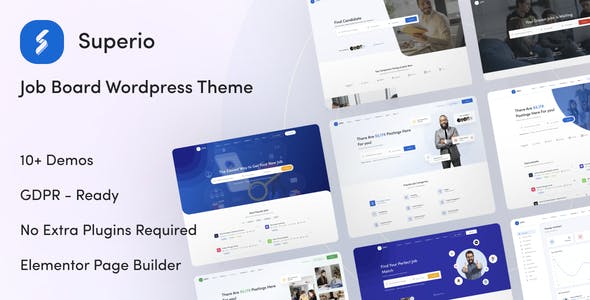
Superio Theme v1.3.37 (Pre-Activated) – Job Board WordPress Theme
Original price was: $49.00.$3.99Current price is: $3.99.
988
Items sold in last 4 weeks
47
People watching this product now!
Description

Superio – Job Board WordPress Theme Overview
Superio – Job Board WordPress Theme is designed for creating professional job portals, recruitment websites, employer directories, candidate resume platforms, and career listing websites using WordPress. It is a niche-focused WordPress theme built for businesses that want more than a simple job listing page. With Superio, you can build a complete online recruitment system where employers can post jobs, candidates can create profiles, and visitors can search opportunities through a clean, modern interface.
This theme is especially useful for recruitment agencies, HR consultants, startup job boards, freelance marketplaces, local employment portals, corporate career websites, and niche hiring platforms. Whether you want to launch a general job board or a focused career website for a specific industry, Superio gives you a ready-made foundation that saves design time and development cost.
Product Analysis
- Product Name: Superio – Job Board WordPress Theme
- Category: WordPress Theme
- Purpose: To create job board, career portal, recruitment, employer listing, and candidate resume websites.
- Industry: Recruitment, human resources, online job marketplace, employment services, staffing, freelancing, and career management.
- Target Audience: WordPress users, developers, freelancers, agencies, bloggers, HR firms, job portal owners, and business website creators.
Creating a Professional Job Portal Without Building From Scratch
Launching a recruitment website can be complicated if you start with a blank WordPress theme. A job board needs dedicated pages for job listings, candidate profiles, employer dashboards, resume search, frontend submissions, pricing packages, login access, and advanced filtering. Superio is made specifically for this workflow, so you do not need to force a generic business theme into a recruitment platform.
The biggest advantage of Superio is that it gives your website a job marketplace structure from the beginning. You can create a platform where employers can publish vacancies, candidates can apply for jobs, and site owners can manage listings from the WordPress dashboard. For agencies and developers, this means faster project delivery. For business owners, it means a polished career website without paying for a fully custom system.
Job Listing Experience Built for Real Hiring Websites
A job portal succeeds when visitors can quickly find relevant opportunities. Superio focuses on making job discovery simple with listing layouts, search tools, sorting options, and job detail pages that feel familiar to modern users. Instead of showing job posts like normal blog articles, the theme presents listings in a structured way with useful employment-related information.
Search, Filter, and Browse Jobs Easily
Superio supports job listing search features that help users narrow results based on important criteria. This is useful for websites that publish many jobs across different industries, cities, job types, experience levels, or companies. A clean search experience can improve user engagement because visitors do not have to scroll endlessly to find suitable openings.
For example, a local job board can allow users to search by city and job category. A freelance hiring website can organize jobs by skill type. A recruitment agency can display vacancies from different employers while keeping the browsing experience simple and professional.
Multiple Listing Layouts for Different Portal Styles
Not every job website needs the same design. Some portals work better with a list-style layout, while others need a more visual directory-style presentation. Superio gives you flexible ways to showcase jobs, resumes, employers, and candidates so you can create a layout that matches your project niche.
This flexibility is helpful for developers and agencies because the same theme can be used for different client projects, such as a corporate hiring website, IT job portal, remote work board, freelancer marketplace, or staffing agency platform.
Employer and Candidate Workflow
A good recruitment website should serve both sides of the hiring process. Employers need a way to publish and manage jobs, while candidates need a place to present their profile, resume, and application details. Superio supports this dual-user experience, making it suitable for building a complete job board website instead of a simple vacancy page.
Employer-Focused Website Structure
Employers can use the site to add job listings from the frontend, manage their published vacancies, and connect with applicants. This makes the platform more scalable because website admins do not need to manually create every job post for every employer.
For monetized job boards, this structure is especially important. You can build a business model around paid job submissions, employer packages, featured listings, or resume access depending on your website strategy and WooCommerce setup.
Candidate Profiles and Resume Visibility
Superio is also useful for candidate-based platforms where users need to create profiles, submit resumes, and apply for suitable jobs. Resume listing and candidate search options can help employers find relevant applicants directly from the platform.
This makes Superio a practical choice for job portals where candidate discovery is as important as job posting. HR agencies, staffing firms, and industry-specific recruitment platforms can use this type of functionality to create a more useful hiring ecosystem.
Recruitment Platform Controls for Better Access Management
One important part of a job board website is controlling who can see what. Some websites allow all visitors to browse jobs freely, while others restrict candidate contact information, employer details, resume pages, or job applications behind registration or paid access. Superio includes useful access control options that can help website owners manage visibility more strategically.
For example, you may want guests to view job titles but require registration before applying. You may allow employers to view candidate profiles only after purchasing a package. You may also want candidate contact details to remain hidden until the employer has permission. These controls can help protect user data and support paid membership models.
Monetization Opportunities for Job Board Owners
Superio is not only about displaying jobs. It can also support revenue-focused job portal ideas. Since the theme is compatible with WooCommerce, website owners can create payment-based workflows such as job posting packages, resume access packages, featured listing plans, or employer membership options.
Possible Revenue Models
- Charge employers for posting job listings.
- Offer featured job placement for better visibility.
- Create employer packages with different posting limits.
- Sell resume or candidate contact access.
- Build niche recruitment subscriptions for agencies.
- Promote premium listings for urgent hiring campaigns.
This makes Superio useful for entrepreneurs who want to launch a job board as an online business. Instead of building a custom paid hiring platform from zero, you can use WordPress, WooCommerce, and Superio together to create a practical recruitment marketplace.
Elementor-Friendly Design for Easy Customization
Superio is suitable for users who want design flexibility without heavy coding. With Elementor compatibility, you can customize pages visually, adjust content sections, edit layouts, and build branded landing pages for your job portal. This is helpful for freelancers and agencies that need to deliver client websites quickly while still keeping the design unique.
You can customize homepage sections, call-to-action areas, employer highlights, job category blocks, pricing sections, and content pages according to your business model. For example, an IT job board can highlight technology categories, while a healthcare recruitment website can feature hospitals, medical roles, and location-based job search.
Ready-Made Pages for Faster Website Launch
Building a recruitment website usually requires many inner pages. You may need pages for job listings, resume listings, employer profiles, candidate dashboards, login, registration, pricing, contact, blog, and help content. Superio includes a collection of useful page templates and layouts that can reduce setup time.
This is valuable for WordPress beginners because they can start with demo content and replace it with their own branding. It is also useful for professional developers because it gives them a faster starting point for client projects.
Responsive Job Board Design for Mobile Users
Many job seekers browse opportunities from mobile devices. If a job board is difficult to use on mobile, users may leave before applying. Superio is built with a responsive layout, which means job listings, search forms, dashboards, and profile pages can adjust across desktops, tablets, and smartphones.
This mobile-friendly approach is important for modern recruitment websites because candidates often search jobs while traveling, during breaks, or directly from social media links. A responsive design can improve usability, reduce bounce rate, and make the application journey smoother.
Useful Website Ideas You Can Build With Superio
Superio can be used for different types of employment-related websites. Its niche-focused layout makes it flexible enough for both broad and specialized recruitment projects.
Local Job Portal
Create a city-based or region-based job board where local businesses can post vacancies and candidates can search nearby opportunities.
Recruitment Agency Website
Showcase available jobs, collect candidate resumes, promote employer services, and manage hiring campaigns from one WordPress website.
Remote Work Board
Build a platform focused on remote jobs, work-from-home opportunities, freelance projects, and global hiring.
Industry-Specific Career Website
Create a niche job portal for IT, healthcare, education, construction, finance, hospitality, digital marketing, or creative professionals.
Corporate Career Platform
Use Superio to create a dedicated careers section for a growing company that wants a professional hiring experience beyond a basic contact form.
How Superio Compares With Generic WordPress Themes
A regular multipurpose WordPress theme can create attractive pages, but it usually does not include recruitment-specific workflows. You may need several plugins, custom post types, extra templates, and manual styling to build a proper job portal. Superio is different because it is created around the job board niche.
Compared with a generic business theme, Superio gives you a more focused structure for job listings, resumes, employer profiles, frontend job submission, search layouts, pricing tables, user dashboards, and candidate management. This makes it a better choice when your main goal is to create a career portal or recruitment marketplace.
SEO Value for Career and Recruitment Websites
Job websites can attract organic traffic when listings, categories, employer pages, and content sections are properly structured. Superio gives you a professional foundation for building search-friendly recruitment pages. You can target keywords like “jobs in Kolkata,” “remote developer jobs,” “healthcare recruitment agency,” “IT job portal,” or “freelance hiring platform” depending on your niche.
For better SEO results, you should also add unique job descriptions, optimized category pages, useful career advice blog posts, employer landing pages, location-based content, and internal links between related jobs. Superio provides the website framework, but high-quality content and proper on-page SEO will help you compete in search results.
Who Should Use Superio?
Superio is a strong option for anyone who wants to build a job board website using WordPress. It is especially suitable for:
- Recruitment agencies launching a professional hiring portal.
- Freelancers creating job board websites for clients.
- Developers building employment platforms with WordPress.
- Business owners planning a niche job listing website.
- HR consultants who want to collect resumes and publish vacancies.
- Agencies offering WordPress job portal development services.
- Entrepreneurs who want to monetize employer listings and candidate access.
Practical Setup Tips Before Using Superio
To get the best result from Superio, plan your job portal structure before importing demo content. Decide whether your website will be free, paid, location-based, category-based, or industry-specific. Create important pages such as About, Contact, Pricing, Employer Guide, Candidate Guide, Privacy Policy, and Terms of Use.
You should also prepare job categories, locations, employer packages, candidate profile fields, and application rules. This makes your site more organized from the beginning and helps users understand how to use the platform.
Superio Theme FAQs
What is Superio – Job Board WordPress Theme used for?
Superio is used to create job board websites, recruitment portals, career platforms, employer directories, candidate resume websites, and hiring marketplaces with WordPress.
Can I use Superio for a recruitment agency website?
Yes. Superio is suitable for recruitment agencies because it supports job listings, employer pages, candidate profiles, resume-related layouts, and frontend job submission workflows.
Is Superio good for a paid job posting website?
Yes. With WooCommerce compatibility, Superio can be used to create paid job posting packages, employer membership plans, featured listings, and resume access models depending on your setup.
Does Superio require coding knowledge?
Superio is designed to be user-friendly for WordPress users. Basic WordPress knowledge is helpful, but you do not need to build the whole job board system from scratch.
Can developers customize Superio for client projects?
Yes. Developers and freelancers can customize Superio for different recruitment niches, including local job portals, remote work platforms, corporate career websites, and industry-specific hiring websites.
Is Superio suitable for mobile job seekers?
Yes. Superio uses a responsive design, so job listings, search forms, profile sections, and important pages can work across desktop and mobile devices.
Can I create a niche job board with Superio?
Yes. Superio can be adapted for niche job boards such as IT jobs, healthcare jobs, education jobs, construction jobs, hospitality jobs, finance jobs, freelance jobs, and remote work opportunities.
Is Superio better than a normal business theme for job websites?
For recruitment websites, Superio is usually a better fit than a generic business theme because it includes job board-focused layouts, candidate and employer workflows, listing search, resume sections, and hiring-related page structures.
Build a Modern Recruitment Website With Superio
Superio – Job Board WordPress Theme is a practical solution for building a professional hiring platform with WordPress. It combines modern design, job listing functionality, employer and candidate workflows, frontend submissions, WooCommerce monetization options, and responsive layouts in one recruitment-focused theme.
If you want to create a job portal, career website, HR platform, resume directory, or paid recruitment marketplace, Superio gives you a strong starting point. It helps you save development time, present jobs professionally, and create a better experience for both employers and candidates.
GPLCARE Updater Plugin
GPLCARE Updater Plugin Tutorial
New to GPLCARE? Watch this step-by-step tutorial to learn how to install, activate, and use the GPLCARE Updater Plugin directly from your WordPress dashboard.

Easy Installation Guide
Install the GPLCARE Updater Plugin in a few steps.

Update Management
Update themes and plugins directly from WordPress.

Tips & Best Practices
Keep your website updated and secure.
Support and updates
What is included?
Documentation You will find the item’s documentation within the .zip file you download.
Updates Available
You'll always have access to the latest features, fixes, and security updates. Simply re-download the item to get the most up-to-date files. You can find the updates change-log on the item’s description.
What is not included?
Author Support
Author support is not available for items downloaded on GPLCare. If you need support from this item’s author, we recommend you take a look at this item on Original Author. If support is offered, you will receive 6 months of support when you purchase the item there.
Technical support from GPLCare
GPLCare doesn’t offer technical support for individual items. If you need further assistance, please visit our Help center and create Support Tickets here.
Automatic updates All updates require manual installation.
Only logged in customers who have purchased this product may leave a review.
Related products
-92%
Original price was: $49.00.$3.99Current price is: $3.99.

-94%
Original price was: $49.00.$2.99Current price is: $2.99.
-92%
Original price was: $49.00.$3.99Current price is: $3.99.
-92%
Original price was: $49.00.$3.99Current price is: $3.99.
Reviews
Clear filtersThere are no reviews yet.