
-92%
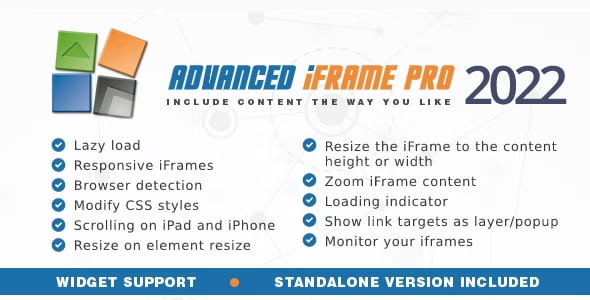
License: GPL | Version: 2022.2 | Developer: Codecanyon
This is The Exact Same File as Distributed by The Developer (Click Here)
Advanced iFrame Pro Plugin 2022.2
Original price was: $39.00.$2.99Current price is: $2.99.
358
Items sold in last 4 weeks
18
People watching this product now!
Description

Important Security Notice For Version 2022.2
Advanced iFrame Pro Plugin 2022.2 is an outdated release and should not be installed on a production website without a careful security review. A publicly documented stored cross-site scripting vulnerability, CVE-2023-4775, affects Advanced iFrame versions up to and including 2023.8. The issue was patched in version 2023.9. Because the downloadable 2022.2 package predates that fix, treat it as a legacy build for controlled testing, compatibility research, or an isolated staging environment rather than a safe current production release.
Do not expose a test installation to untrusted users, and do not assume that one known advisory is the only risk associated with an older package. Use a currently maintained release from the original developer when security, vendor updates, or production support matters. If this version is already active, back up the site, review its configuration and user roles, test a supported update on staging, and replace the affected build as soon as practical.
Advanced iFrame Pro Plugin 2022.2 Overview
Advanced iFrame Pro is a WordPress embedding tool for site owners who need more control than a basic HTML iframe provides. A normal iframe can display another page inside a rectangular area, but it offers limited help with responsive sizing, cropping, delayed loading, parameter handling, device-specific behaviour, or monitoring. This plugin adds an administration interface and shortcode-based workflow for configuring those details.
The core idea is to include external or internal web content in a way that fits the surrounding WordPress layout. Depending on the source page, domain relationship, browser security rules, and level of access to the embedded page, the plugin can resize the frame, show only a selected area, hide unwanted regions, zoom non-responsive content, forward parameters, alter CSS, adjust link behaviour, or load the iframe only when it is needed.
This flexibility is useful for dashboards, booking systems, maps, forms, documentation, internal tools, legacy applications, remote catalogues, calculators, and partner resources. However, an iframe is not a copy of the remote page. The embedded website remains responsible for its content, availability, cookies, response headers, and security policies. Successful implementation begins with checking what the source permits.
Understand The Three Main Embedding Scenarios
The official quick-start guidance separates iframe projects into three practical scenarios. Knowing which one applies prevents wasted setup time and unrealistic expectations.
Content That Cannot Be Framed
A remote website can send security headers that prevent other sites from displaying it inside an iframe. Common controls include X-Frame-Options and Content Security Policy directives such as frame-ancestors. A WordPress plugin cannot legitimately override a remote owner’s browser-enforced restriction. If the source refuses framing, obtain permission, use an approved integration method, or choose an API or direct link instead.
Content On A Different Domain
When the parent WordPress site and the iframe source use different origins, the browser’s same-origin policy limits direct access to the embedded document. Basic display, fixed sizing, cropping by positioning, and some zoom techniques may still be possible. Features that need to inspect the remote document, read its height, modify its CSS, or hide specific elements generally require cooperation from that page.
The developer provides an external workaround that involves adding a line of JavaScript to the remote page. This is practical when you control both websites or can ask the remote administrator to add the script. Without that cooperation, do not promise automatic height measurement or internal DOM modification.
Content On The Same Domain
When the parent and embedded pages meet the same-origin requirements, the plugin can use its broadest feature set. It can interact more directly with the iframe document, respond to dynamic height changes, modify styling, and coordinate behaviour between the parent and child pages. Be precise when evaluating “same domain”: different subdomains, ports, or protocols can produce a different origin even when the names appear related.
Show A Selected Part Of A Remote Page
Advanced iFrame Pro can be used to present a selected region rather than exposing an entire remote layout. This is valuable when a partner page contains a navigation header, sidebar, footer, or other surrounding areas that are unnecessary within the WordPress page. The included area-selection workflow helps identify the visible section by coordinates, and the frame can then be positioned and clipped around that region.
This approach does not delete remote elements. It changes the viewport through which the external page is seen. If the remote design changes, the selected coordinates may no longer match, so the result must be monitored. A cropped area should be tested across browser sizes and after any major source-site redesign.
The plugin can also hide selected areas and combine cropping with zoom for a more integrated result. Whether a particular hide or CSS rule works depends on the same-origin relationship or the external workaround. Always distinguish between visually covering or cropping an area and actually editing the iframe document.
Responsive Iframe Sizing And Auto Height
Responsive design is one of the most common iframe challenges. A fixed 1,000-pixel-wide application may overflow a phone, while a fixed frame height can create nested scrollbars or large blank areas. Advanced iFrame Pro offers several strategies, including percentage-based dimensions, responsive ratios, content zoom, auto zoom, and automatic height when the setup permits it.
Automatic height is most reliable on the same domain or when the remote page includes the developer’s helper JavaScript. The plugin can then detect the content height and react to dynamic changes inside the iframe. This matters for accordions, validation messages, search results, and other embedded interfaces whose height changes after initial load.
Auto zoom calculates a scale factor based on the available browser width. It can make a fixed-width legacy page fit a mobile viewport when the remote application cannot be rebuilt responsively. Zoom is a visual compromise, not a substitute for a genuinely responsive source. Small controls and text may become hard to use, so review tap targets, legibility, and keyboard interaction on real devices.
Hide Elements And Change CSS
For a same-origin iframe, or a cross-domain iframe using the supported external script, the plugin can apply CSS rules to the embedded page. This may help remove a duplicate header, suppress a footer, adjust static widths, or correct spacing so the remote content fits the surrounding layout. It can also change CSS in the parent page for coordinated presentation.
CSS modification requires basic knowledge of HTML structure and selectors. Inspect the target page, identify stable classes or IDs, and avoid selectors that depend on frequently changing generated markup. If the remote owner redesigns the page, rules can stop matching or hide the wrong element. Document every customization and retest it after source updates.
Do not use hiding controls to misrepresent ownership, remove legally required disclosures, bypass payment, or conceal security warnings. The site owner remains responsible for obtaining permission and respecting the embedded service’s terms.
Lazy Loading And Loading Indicators
An iframe may load a complete application, analytics, fonts, media, and third-party scripts. Loading all of that with the parent page can delay interactivity and consume bandwidth even when the visitor never scrolls to the embedded section. Advanced iFrame Pro includes several delayed-loading methods intended to reduce that initial cost.
- Load After The Main Page: Prioritise the WordPress document before requesting iframe content.
- Load When Visible: Request the iframe when its position enters the relevant viewport area.
- Load On Button Click: Wait for an explicit visitor action before connecting to the remote source.
- Show A Loading Icon: Present feedback while the embedded application finishes loading.
Click-to-load can also support a more privacy-conscious design because a third-party connection is postponed until the visitor chooses to continue. It is not automatically a complete consent solution; cookies, tracking, privacy notices, and regional requirements still need to be evaluated separately.
Forward Parameters And Build Context-Aware Embeds
The plugin can forward query parameters from the WordPress parent URL to the iframe source. This is useful when an embedded search, catalogue, report, or booking page should open with a value already selected. Placeholders can also provide contextual values, including details related to the current WordPress user where configured.
Parameter forwarding must be planned carefully. Validate accepted values, avoid exposing secrets in URLs, and never rely on a forwarded username as proof of authentication. Sensitive access decisions belong in a secure server-side integration. Query strings may appear in browser history, analytics, logs, referrer data, and shared links.
The plugin can also represent the current iframe URL in the parent URL so visitors can bookmark or share a particular embedded state. That can improve usability for multi-page iframe applications, but the destination should be checked to prevent open redirects or untrusted content from being inserted into a URL workflow.
Link Targets And Layered Iframe Navigation
Advanced iFrame Pro provides controls for link targets in the parent page and, when the technical setup permits, inside the iframe. Links can be redirected to a new destination or opened in an additional iframe layer so the visitor remains on the WordPress page. A custom header or footer can be added around that layered view.
This can create a smoother flow for reference pages or catalogues, but it should not trap visitors. Provide an obvious close action, retain keyboard access, make the destination clear, and offer a direct-link fallback. Embedded navigation should be tested with browser history, the back button, mobile scrolling, and assistive technology.
Device Detection And Browser Workarounds
Some remote websites present different layouts on phones and desktops. The plugin’s browser and device detection can show a different iframe, source, or cropped region for a detected device. This can help when the external page does not provide one layout that works everywhere.
The feature should be used as a fallback rather than a permanent replacement for responsive design. User-agent detection can change over time, tablets fall between categories, and desktop-mode settings can alter results. Always include a sensible default and test representative devices.
The developer also documents workarounds for historical iOS iframe scrolling behaviour and third-party cookie limitations. Modern browsers increasingly restrict third-party cookies and storage for privacy. No plugin can guarantee that a remote login or session will work in every browser configuration. Test the exact external service, and prefer a supported first-party or token-based integration when authentication is essential.
Mixed Content And HTTPS Requirements
An HTTPS WordPress page should not embed an HTTP source. Modern browsers block mixed active content, which can leave the iframe blank or show a security error. Use an HTTPS source with a valid certificate. Changing the shortcode does not make an insecure remote page secure.
Before publishing, confirm that the source URL loads directly over HTTPS, permits iframe inclusion, and does not redirect to an HTTP address. Also check that every critical asset used inside the embedded page is secure. A page can begin on HTTPS and still fail if its scripts or resources use blocked insecure URLs.
Iframe Monitoring And Blank-Page Prevention
Remote pages can stop working without any change to the WordPress site. The source may go offline, change its URL, add frame-blocking headers, require authentication, or alter its redirects. Advanced iFrame Pro includes an iframe checker that can inspect configured iframes and, according to the developer, monitor ordinary iframe embeds as well.
Scheduled checks can help identify broken integrations before visitors repeatedly encounter a blank box. Monitoring still requires interpretation: a successful HTTP response does not guarantee that login, interaction, cropping, or dynamic content works correctly. Combine automated checks with periodic manual testing of the published workflow.
Gutenberg Block, Shortcode, And Widget Options
The plugin supports a shortcode workflow, includes a Gutenberg block with a preview, and supplies a widget that can render an iframe or another shortcode in a widget area. The shortcode can use settings saved in the administration panel or override selected values per embed.
A basic implementation uses the [advanced_iframe] shortcode and the configuration stored under the Advanced iFrame settings. The security key is available in the plugin administration. For several iframe instances, review the documentation carefully because identifiers, scripts, and page-specific options need to remain distinct.
Shortcodes are convenient for classic content and templates, while the Gutenberg block can make placement easier for block-editor users. Whichever method is used, keep one documented source of truth for important URLs, dimensions, CSS selectors, and parameter rules.
Practical Use Cases
- Internal Dashboards: Present an organisation’s same-domain reporting interface inside a protected WordPress page.
- Partner Booking Tools: Embed an authorised third-party reservation flow and forward non-sensitive context.
- Legacy Applications: Scale a fixed-width interface while a proper responsive replacement is being developed.
- Maps And Calculators: Delay heavy interactive content until it becomes visible or the visitor clicks.
- Documentation Portals: Show a relevant section of an approved external knowledge base.
- Product Configurators: Contain an existing tool within a landing page while keeping a direct-link fallback.
- Remote Status Pages: Monitor whether the framed source remains available and permitted.
For other specialised website tools, browse the WordPress Plugins Collection. If an Elementor project also needs styled text sections around an embedded application, review Advanced Heading And Animated Text For Elementor. These links cover related WordPress presentation workflows without implying that either product is required.
Installation And Initial Configuration
- Create a full backup and use an isolated staging site, especially because version 2022.2 predates a known security fix.
- Upload the plugin ZIP through Plugins, Add New, and Upload Plugin, or place the correct plugin folder in the WordPress plugins directory.
- Activate the plugin and open its settings page in the WordPress dashboard.
- Confirm that the target URL uses HTTPS and check whether the remote site permits framing.
- Determine whether the source is same-origin, cross-origin with script access, or cross-origin without cooperation.
- Configure the URL, size, responsive method, loading behaviour, and any permitted CSS or parameter rules.
- Insert the block, widget, or
[advanced_iframe]shortcode into a test page. - Review desktop, tablet, mobile, keyboard, cookie, and login behaviour before publishing.
- Replace the legacy package with a security-maintained version before any production deployment.
Performance, Privacy, And Accessibility Checklist
Test the complete page with normal caching and optimisation enabled. Lazy loading can improve the parent page’s initial work, but the remote application still has its own performance cost when requested. Avoid embedding several heavy applications above the fold, and use a meaningful placeholder so visitors know what will load.
Update the privacy notice when the iframe connects to a third party, transfers an IP address, stores cookies, or processes visitor data. A click-to-load button can provide context before the connection, but legal requirements vary and should be reviewed for the site’s audience.
Give the iframe a descriptive title for screen readers. Make sure keyboard users can enter and leave the frame, provide a direct link to the source, avoid inaccessible nested scrolling, and confirm that zoom does not make text or controls unusably small. If the remote page is inaccessible, the WordPress wrapper cannot fully repair it.
Known Version Risk And Upgrade Guidance
The package title identifies version 2022.2. The original product has continued to evolve beyond that release. Security research documents CVE-2023-4775 as affecting versions through 2023.8, with the fix in 2023.9. Version 2022.2 therefore falls inside the affected range.
Use this download only when a legacy version is specifically needed for research in a restricted environment. For a public website, obtain a current release, read every intervening changelog, and test the upgrade on staging. Settings are stored in the database according to the developer, but a backup is still essential. If the external helper script is used, update or regenerate it as required by the current documentation and clear related caches.
GPL Download And Support Information
This GPLCARE listing provides a GPL-distributed downloadable package. GPL distribution does not automatically include the original CodeCanyon account, purchase code, direct developer support, hosted services, automatic marketplace updates, or a current vendor licence. If those services or the newest supported release are required, purchase or subscribe through the original developer.
Always compare the supplied version with the developer’s maintained release before installation. Scan the archive, verify file integrity, use least-privilege WordPress roles, and keep security monitoring active. An iframe plugin handles URLs, browser communication, and potentially user-specific parameters, so outdated code deserves extra caution.
Frequently Asked Questions
Can Advanced iFrame Pro Embed Any Website?
No. The remote site must permit iframe inclusion. Browser-enforced security headers can block framing, and the plugin cannot override the remote owner’s policy.
Can It Automatically Resize A Cross-Domain Iframe?
Automatic content-height detection generally requires the same origin or the developer’s external JavaScript workaround on a remote page you can modify. Without cooperation, browser security restrictions limit access to the iframe document.
Can It Show Only One Part Of A Remote Page?
Yes, the plugin includes area selection, cropping, hiding, and zoom-related tools. The exact method and reliability depend on the source, browser, and whether internal document access is available.
Does Lazy Loading Make The Remote Page Faster?
Lazy loading postpones the iframe request so the parent page can load first. It does not optimise the remote application itself; that content still needs to load when the trigger occurs.
Is Version 2022.2 Safe For Production?
It should not be treated as a safe current production build. It predates the 2023.9 fix for CVE-2023-4775 and may miss later security and compatibility updates. Use a maintained release for a live site.
Will Third-Party Login Always Work Inside The Iframe?
No. Browser privacy controls, third-party cookie restrictions, source headers, and authentication design can prevent sessions from working. Test the exact service and use its supported integration method when login is critical.
Does A GPL Download Include CodeCanyon Support?
No. The GPL package does not automatically provide the original marketplace account, purchase code, automatic updates, or direct vendor support.
Final Assessment
Advanced iFrame Pro is a capable toolkit for complex WordPress embedding projects. Its strongest features address real iframe problems: responsive sizing, dynamic height, selected-area display, CSS adjustments, zoom, lazy loading, parameter forwarding, device rules, link handling, Gutenberg placement, and monitoring. The feature available to a particular project depends heavily on browser security boundaries and control over the remote source.
The 2022.2 package is best understood as a legacy download, not the current product. Use it only in a controlled test environment, respect framing permissions, validate every parameter, and plan around privacy and accessibility. For production, move to a maintained version that includes published security fixes and current compatibility work.
GPLCARE Updater Plugin
GPLCARE Updater Plugin Tutorial
New to GPLCARE? Watch this step-by-step tutorial to learn how to install, activate, and use the GPLCARE Updater Plugin directly from your WordPress dashboard.

Easy Installation Guide
Install the GPLCARE Updater Plugin in a few steps.

Update Management
Update themes and plugins directly from WordPress.

Tips & Best Practices
Keep your website updated and secure.
Support and updates
What is included?
Documentation You will find the item’s documentation within the .zip file you download.
Updates Available
You'll always have access to the latest features, fixes, and security updates. Simply re-download the item to get the most up-to-date files. You can find the updates change-log on the item’s description.
What is not included?
Author Support
Author support is not available for items downloaded on GPLCare. If you need support from this item’s author, we recommend you take a look at this item on Original Author. If support is offered, you will receive 6 months of support when you purchase the item there.
Technical support from GPLCare
GPLCare doesn’t offer technical support for individual items. If you need further assistance, please visit our Help center and create Support Tickets here.
Automatic updates All updates require manual installation.
Only logged in customers who have purchased this product may leave a review.
Related products
-90%
Original price was: $39.00.$3.99Current price is: $3.99.

-92%
Original price was: $39.00.$2.99Current price is: $2.99.

-90%
Original price was: $39.00.$3.99Current price is: $3.99.

-92%
Original price was: $39.00.$2.99Current price is: $2.99.
Reviews
Clear filtersThere are no reviews yet.